How to Download Manga from MangaOwl?

Online manga platforms have made it easier than ever for fans to read their favorite series anywhere. Among these platforms, MangaOwl gained popularity for offering a huge collection of manga, manhwa, and webtoons in one place. The site attracted millions of readers thanks to its extensive library, frequent updates, and easy navigation system.
Readers typically use MangaOwl to read manga chapters online, but many fans also prefer downloading chapters for offline reading, archiving their favorite series, or organizing manga into volumes on their own devices. Offline access is particularly helpful when traveling, studying, or reading on devices without a stable internet connection.
In this guide, we’ll explore several ways to download manga chapters from MangaOwl. By the end of this article, you’ll know the most practical method for saving entire manga chapters quickly and efficiently.
1. Manual Download of MangaOwl Chapters
The most basic way to get manga from MangaOwl is to download each chapter page manually. Since most manga websites display chapters as separate image files, you can download them directly from your browser.
Steps to manually download MangaOwl chapters:
- Navigate to the MangaOwl site and search for the manga you want using the search bar or browse through categories.
- Click the manga title to open the series page, which lists all available chapters.
- Choose the chapter you want to download and begin reading it in the web viewer.
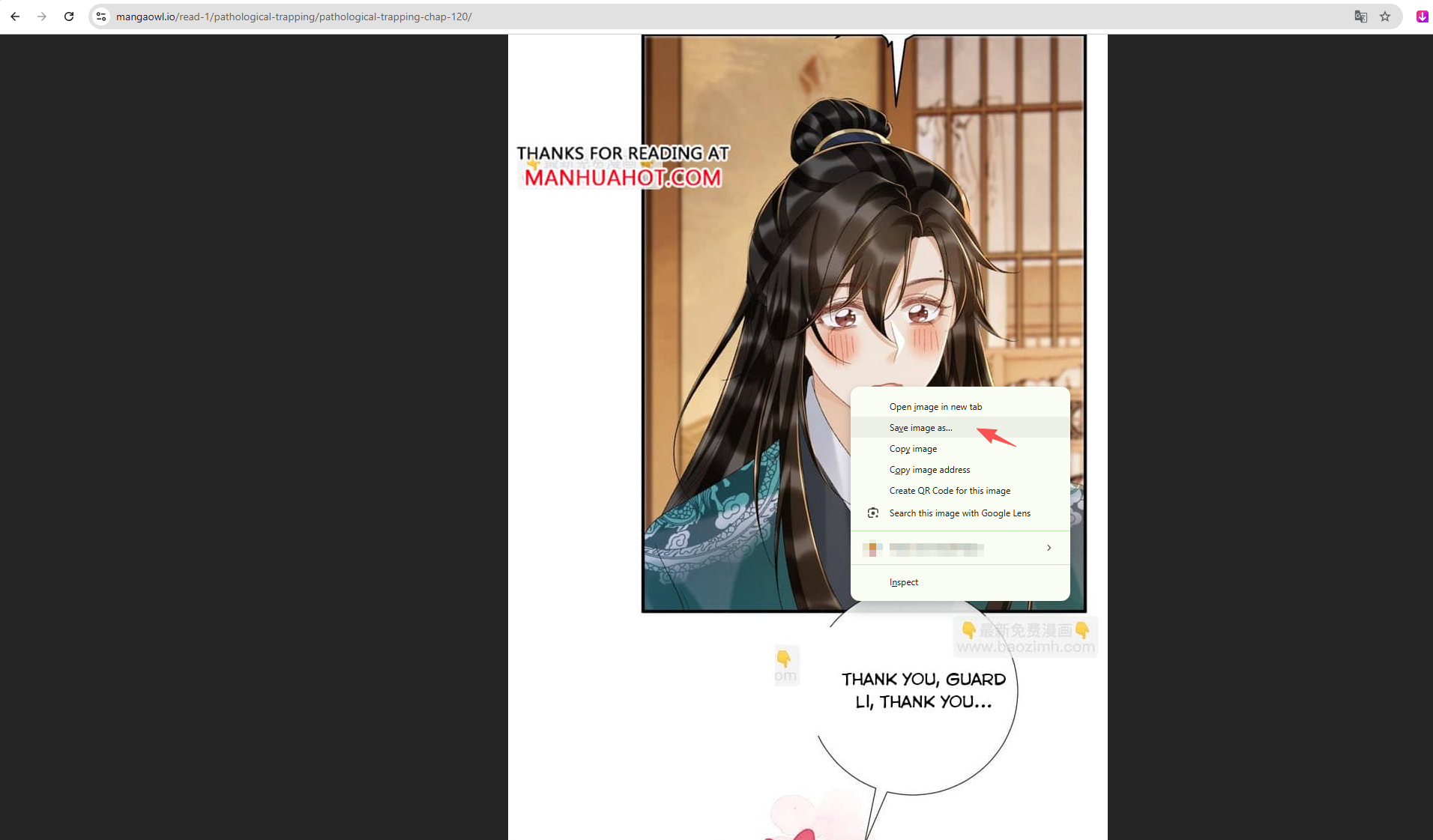
- Right‑click on the manga page image and select “Save Image As.”
- Store the images in a folder named after the manga series and chapter number.
Pros:
- No software required
- Works on any browser
- Full control over saved files
Cons:
- Extremely time‑consuming
- Requires downloading each page individually
- Difficult for long chapters or multiple volumes
Manual downloading is useful for occasional chapters, but it quickly becomes inefficient if you want to download entire manga series.
2. Download MangaOwl Chapters with Online Downloaders
Another option is to use online image downloaders or page scrapers. These tools analyze a webpage and extract media files such as images.
Online downloaders typically work by scanning a webpage’s source code and collecting image URLs. If a MangaOwl chapter page contains multiple image files, the downloader can detect them and allow you to save them all at once.
Steps to download MangaOwl chapters using online image downloaders:
- Open an online image downloader website like image extractor.
- Copy the URL of the manga chapter page and paste the chapter URL into the input field.
- Start scanning the webpage, then select the detected images and download them.
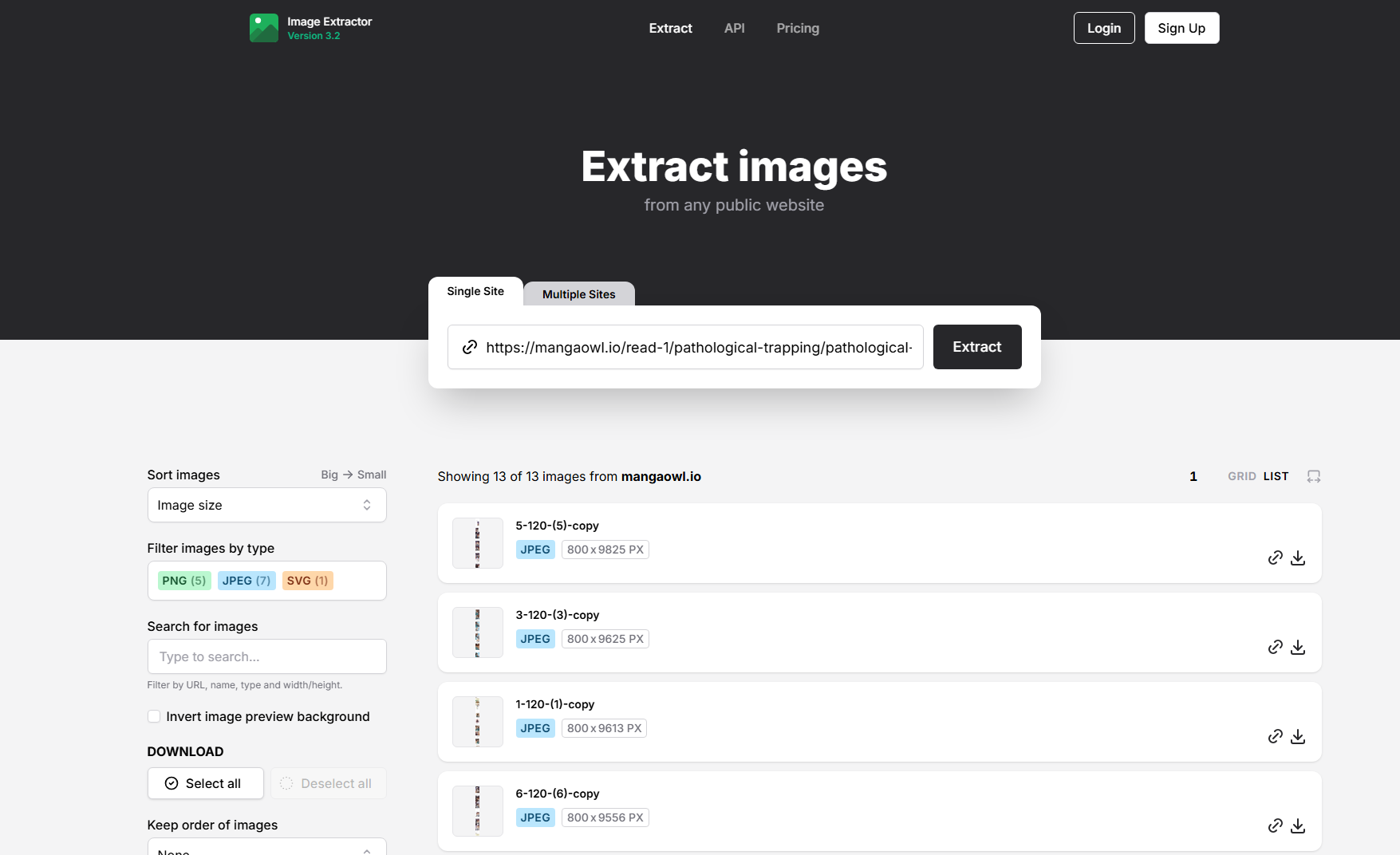
Some tools may allow you to download all images as a ZIP archive.
Pros:
- No installation required
- Faster than manual downloading
- Can download multiple images at once
Cons:
- Some sites block online scrapers
- Many tools have download limits
- Privacy and security risks on unknown websites
Because online downloaders rely on third‑party servers, they may not always work reliably with manga websites.
3. Download MangaOwl Chapters with Browser Extensions
Browser extensions provide another convenient way to download manga chapters. These tools integrate directly with your browser and detect images on the webpage automatically.
Steps to download MangaOwl chapters using extensions:
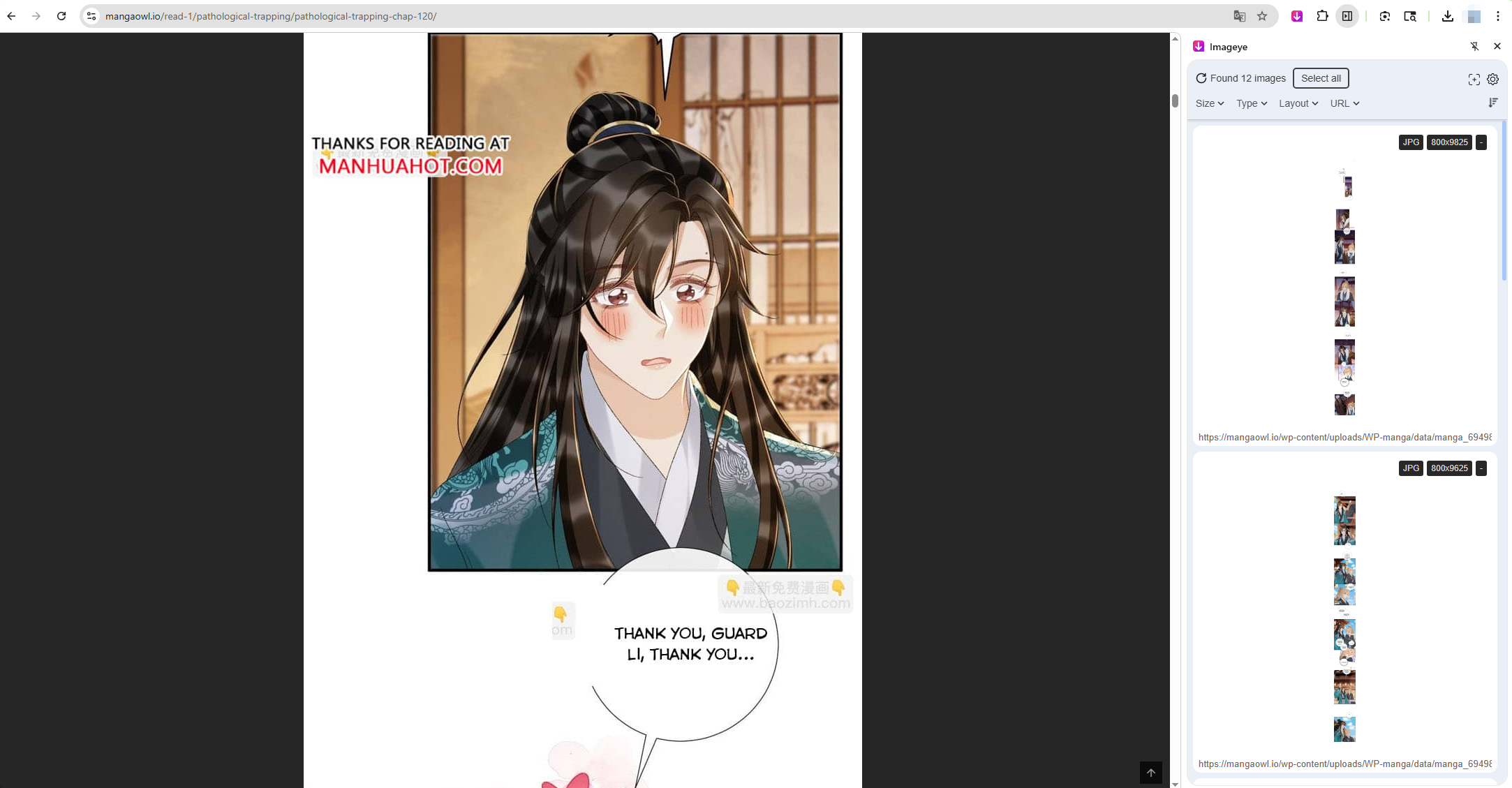
- Install an image downloader extension like Imageye in your browser.
- Open the MangaOwl chapter page and click the extension icon in your browser toolbar to let the extension scan the page.
- Select the MangaOwl page images from the list and download them all in one click.
Pros:
- Faster than manual downloading
- Integrated into your browser
- Easy batch image selection
Cons:
- Some extensions cannot detect images loaded dynamically
- Websites may block extensions
- Limited control over large downloads
While extensions can speed up downloads, they are often designed for single pages, making them less effective for downloading entire manga series.
4. Advanced Bulk Download MangaOwl Chapters with Imaget
If you want to download multiple manga chapters or entire series, a dedicated bulk downloader like Imaget is a much more efficient solution.
Imaget is a powerful bulk image downloader that can scan webpages, detect full‑resolution images, and download them in batches.
Key advantages of Imaget include:
- Bulk downloading from all image hosting webpages.
- Auto sroll page to detect high‑quality images.
- Support filtering images based on their types and sizes.
- One-click download for all selected images in popular file formats.
Steps to download MangaOwl chapters using Imaget
- Start by downloading and installing the Imaget bulk image downloader on your PC or Mac.
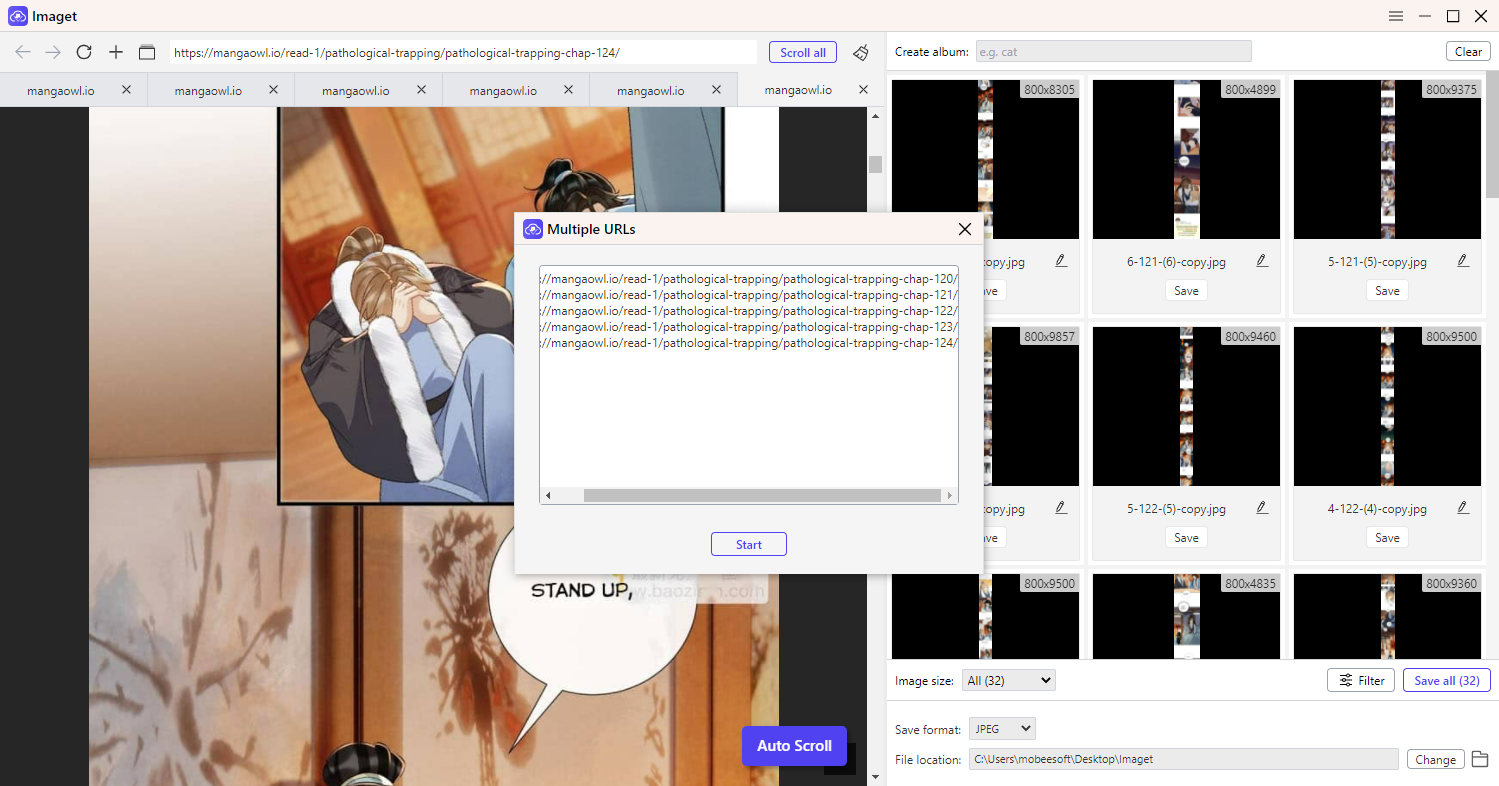
- Open MangaOwl in the Imaget browser and let the software scroll to detect all available images. Next you can select desired manga images with click “Save all” to download them in one-click.
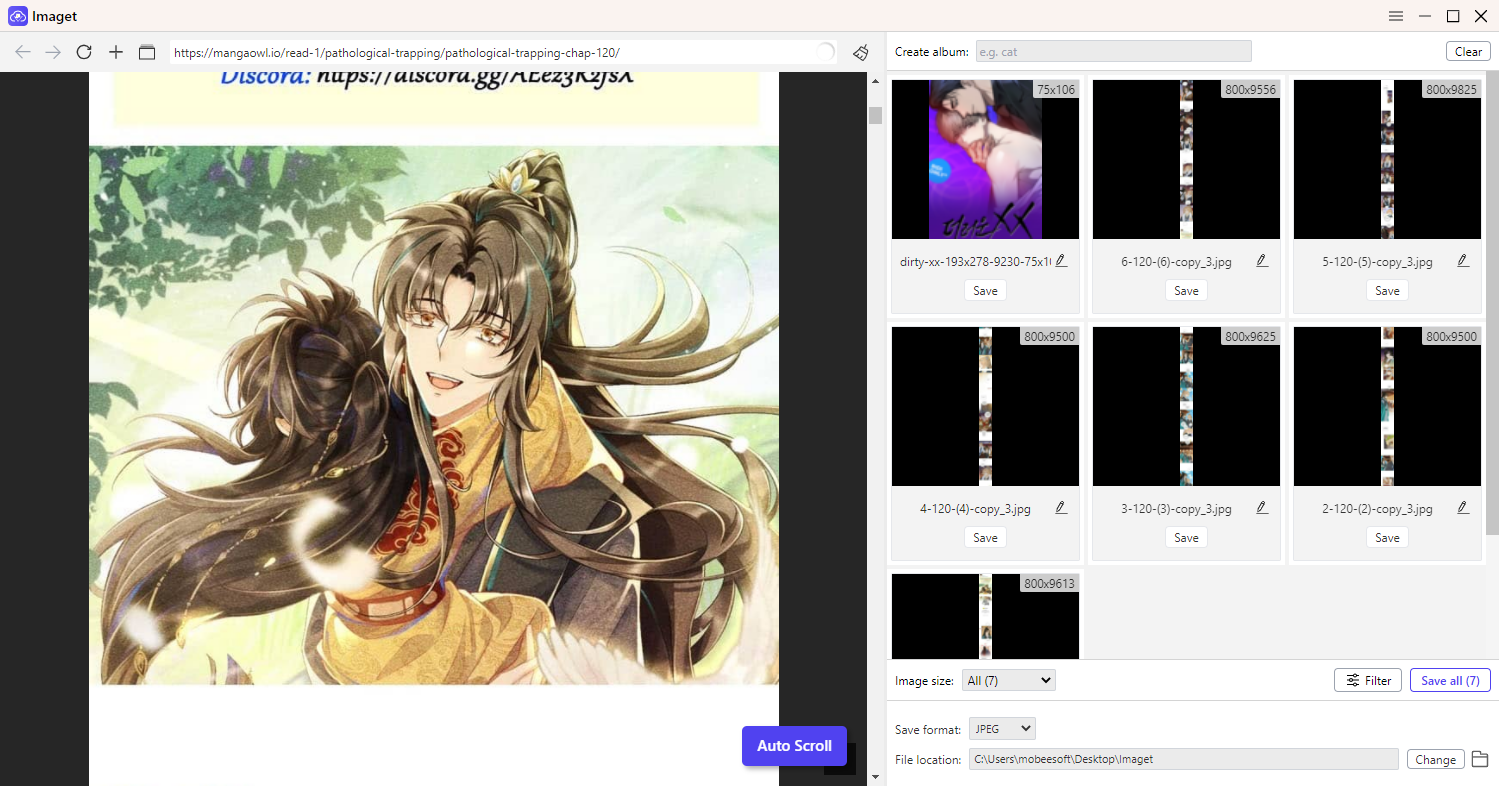
- You can also collect the MangaOwl chapter URLs, paste them into Imaget and the software will open them in seperate tabs and extract all the images.
5. Conclusion
Downloading manga chapters from MangaOwl can be done in several ways depending on your needs and technical preferences.
Manual downloading is the simplest method but requires saving each page individually, making it slow for long chapters. Online downloaders can capture multiple images at once, but they may have limitations or compatibility issues. Browser extensions provide a convenient middle ground, allowing users to detect and download images directly from their browser.
However, if you want the most efficient and scalable solution, using a dedicated bulk image downloader is the best option. Tools like Imaget can automatically detect manga pages, download entire chapters in batches, and save them in high quality.
For manga fans who want to build an offline library or download large collections of chapters, Imaget is the most recommended solution thanks to its speed, automation, and powerful bulk downloading capabilities.