Best Ways to Download Bomtoon Manga for Offline Reading

Reading webtoons online is convenient, but it isn’t always reliable when you’re traveling, commuting, or dealing with unstable internet access. That’s why many readers look for ways to save content from Bomtoon for offline reading.
Although the platform is primarily designed for online streaming-style reading, there are still several practical methods you can use to download or save chapters for personal offline access. In this guide, we’ll explore several effective ways to download Bomtoon manga, with each method offering different advantages depending on how frequently you read, how many chapters you want to save, and how organized you want your offline library to be.
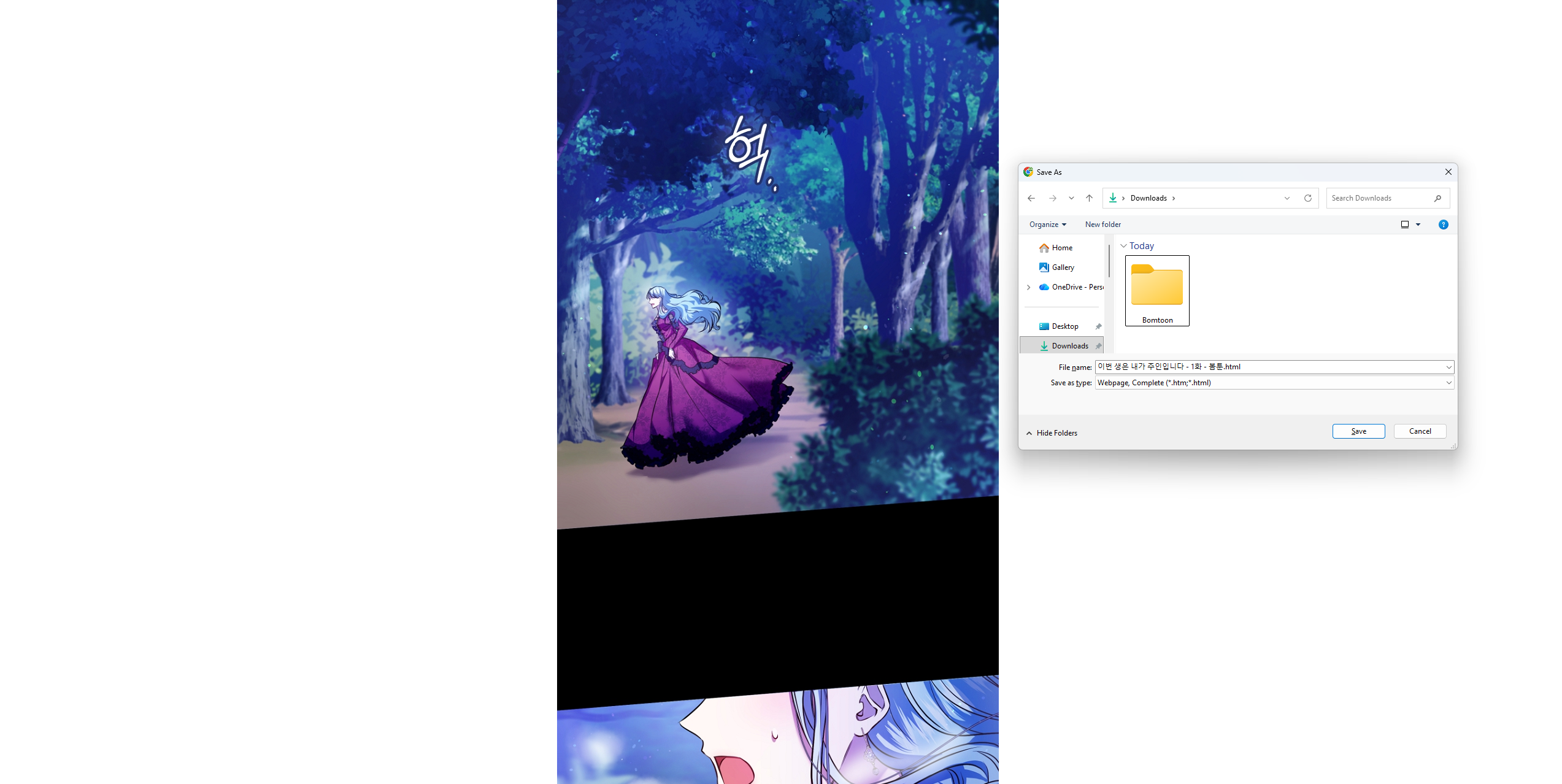
1. Download Bomtoon Manga Using The Browser “Save Page As” Feature
One of the simplest ways to save webtoon content from Bomtoon is by using your browser’s built-in saving tools. This method works on most desktop browsers like Chrome, Edge, and Firefox and does not require any additional software.
How to use it:
- In your browser, open a Bomtoon chapter and simply press Ctrl + S or Command + S to continue.
- Select the “Webpage Complete” option to keep a full copy of the Bomtoon page on your device.
You can also convert chapters into PDF format:
- Press Ctrl + P / Command + P
- Select “Save as PDF”
- Export and store the file
Pros:
- Built-in and easy to use
- No installation required
- Good for saving individual chapters
Cons:
- Formatting may not always be perfect
- Not ideal for large collections
- Some dynamic content may not save properly
This method works best for saving a few items occasionally, rather than creating a full offline collection.
2. Download Bomtoon Manga Using Online Downloaders
Online image downloaders are web-based tools that help users save images or pages by simply pasting a URL.
How it works:
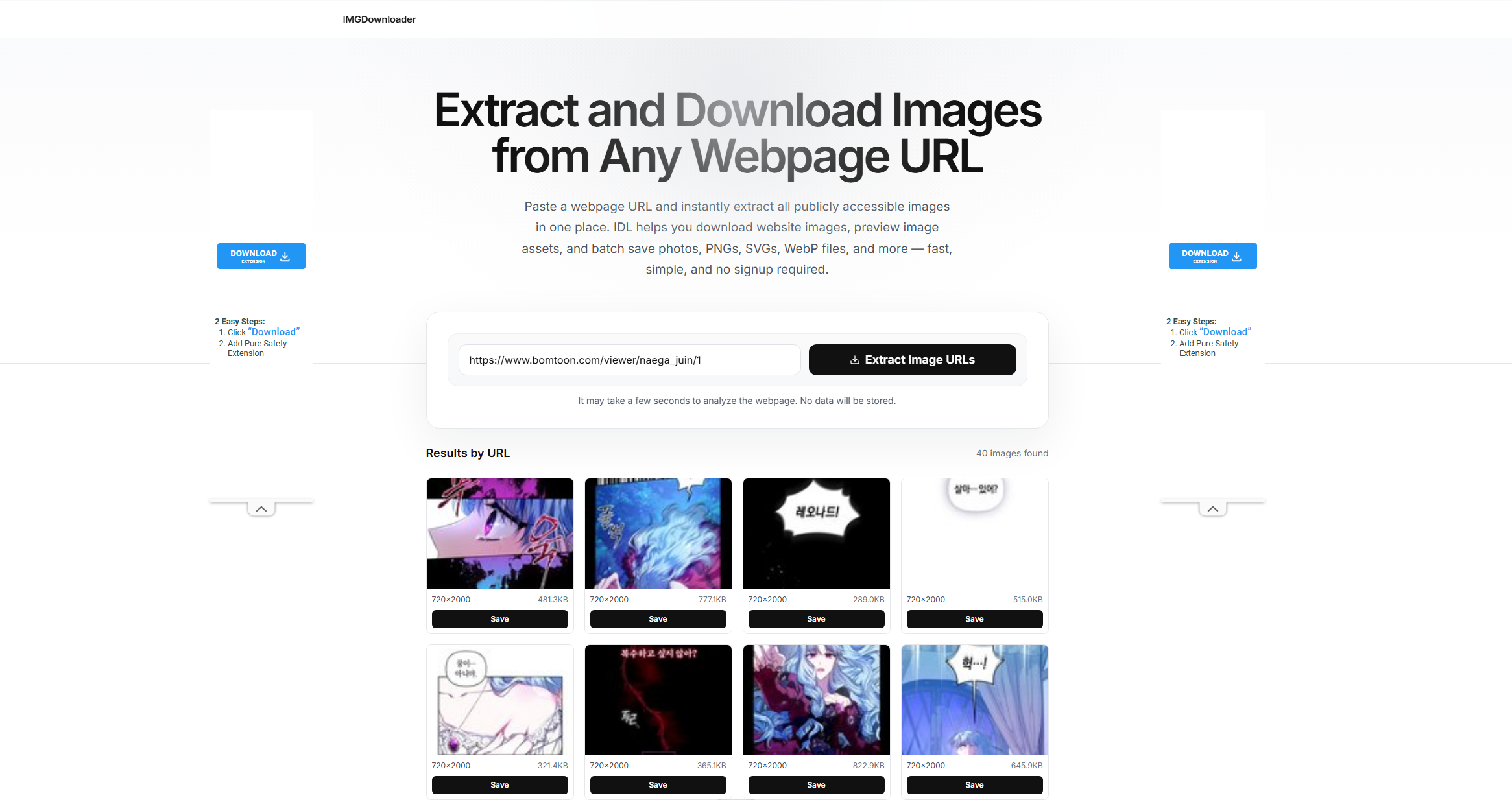
- Copy the chapter link from Bomtoon and aste it into an online downloader website like ImgDownloader.
- Select the Bomtoon manga images you want and download the detected files directly to your device.
Pros:
- No software installation required
- Works on both mobile and desktop
- Simple and quick for single chapters
Cons:
- Not always compatible with Bomtoon platforms
- May fail with dynamic or protected content
- Limited support for bulk downloads
- Quality can vary depending on the tool
Online downloaders are useful for quick one-time downloads but are not ideal for long-term offline reading.
3. Download Bomtoon Manga Using Browser Extensions
Browser extensions provide a more integrated way to download content directly from your browser while reading webtoons.
How to use:
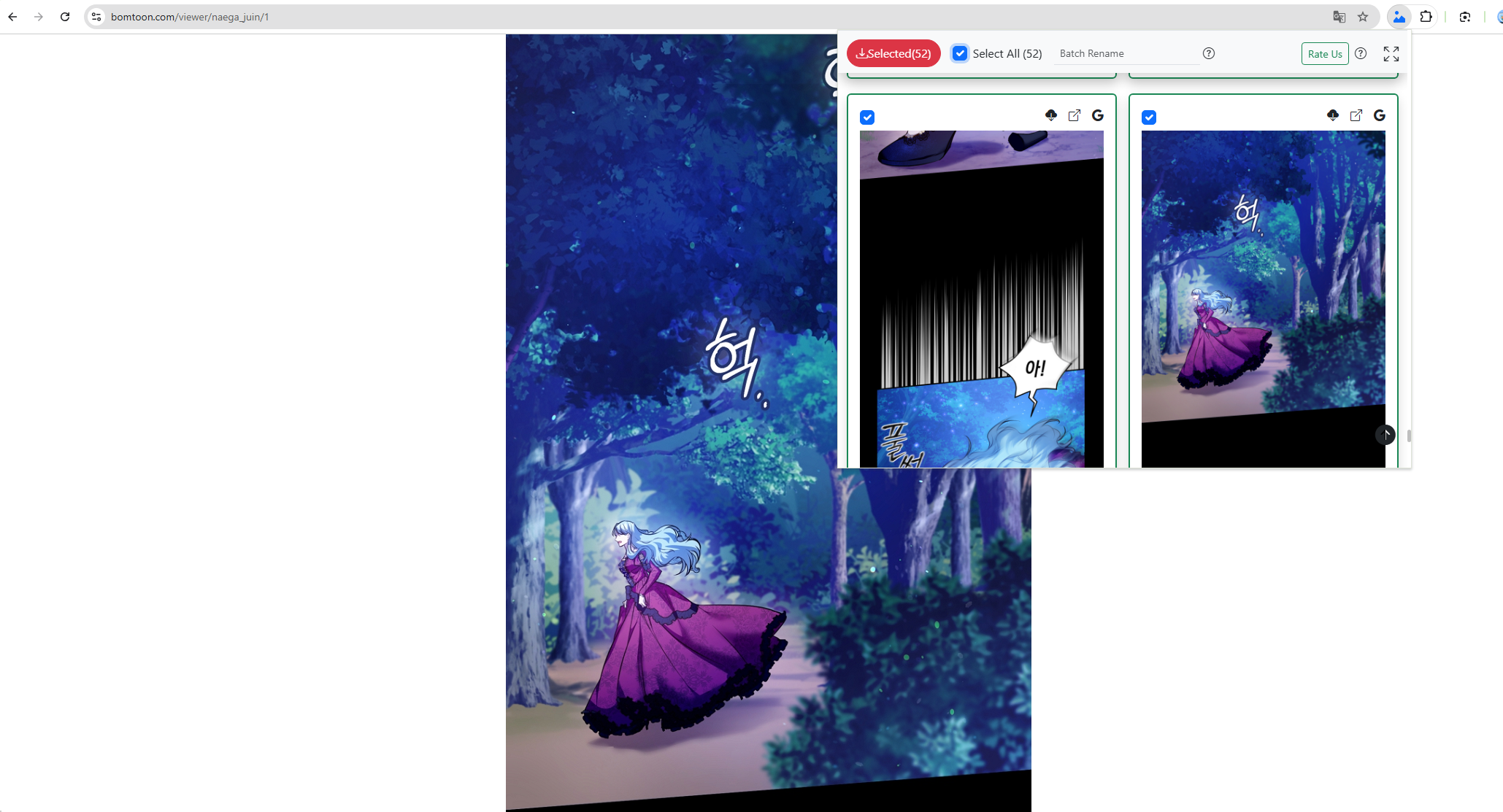
- Add a reliable extension like Bulk Image Downloader (HImage) to your browser.
- Open a Bomtoon chapter in your browser and click the HImage extension from the toolbar.
- Select images or content to download, then save files locally.
Pros:
- Convenient browser integration
- Faster than manual saving
- Useful for multiple images per page
Cons:
- May not work on all websites
- Can break after site updates
- Some extensions may raise privacy concerns
- Limited organization features
Extensions are best for users who want a semi-automated approach without installing full desktop software.
4. Advanced Bulk Download Bomtoon Manga with Imaget
For users who want a more powerful and efficient solution, Imaget offers advanced bulk downloading capabilities that go beyond manual or browser-based methods.
Imaget is designed to automatically detect and download images from web pages, making it especially useful for saving multiple chapters of webtoons at once.
Key features of Imaget:
- Bulk download images and GIFs from image hosting websites.
- Automatically scroll pages to detect downloadable images.
- Filter images by size, resolution, and file format.
- Export images in PNG, JPG, WebP, or original file types.
- Organize downloads with custom folders and image renaming options.
How to use Imaget for Bomtoon:
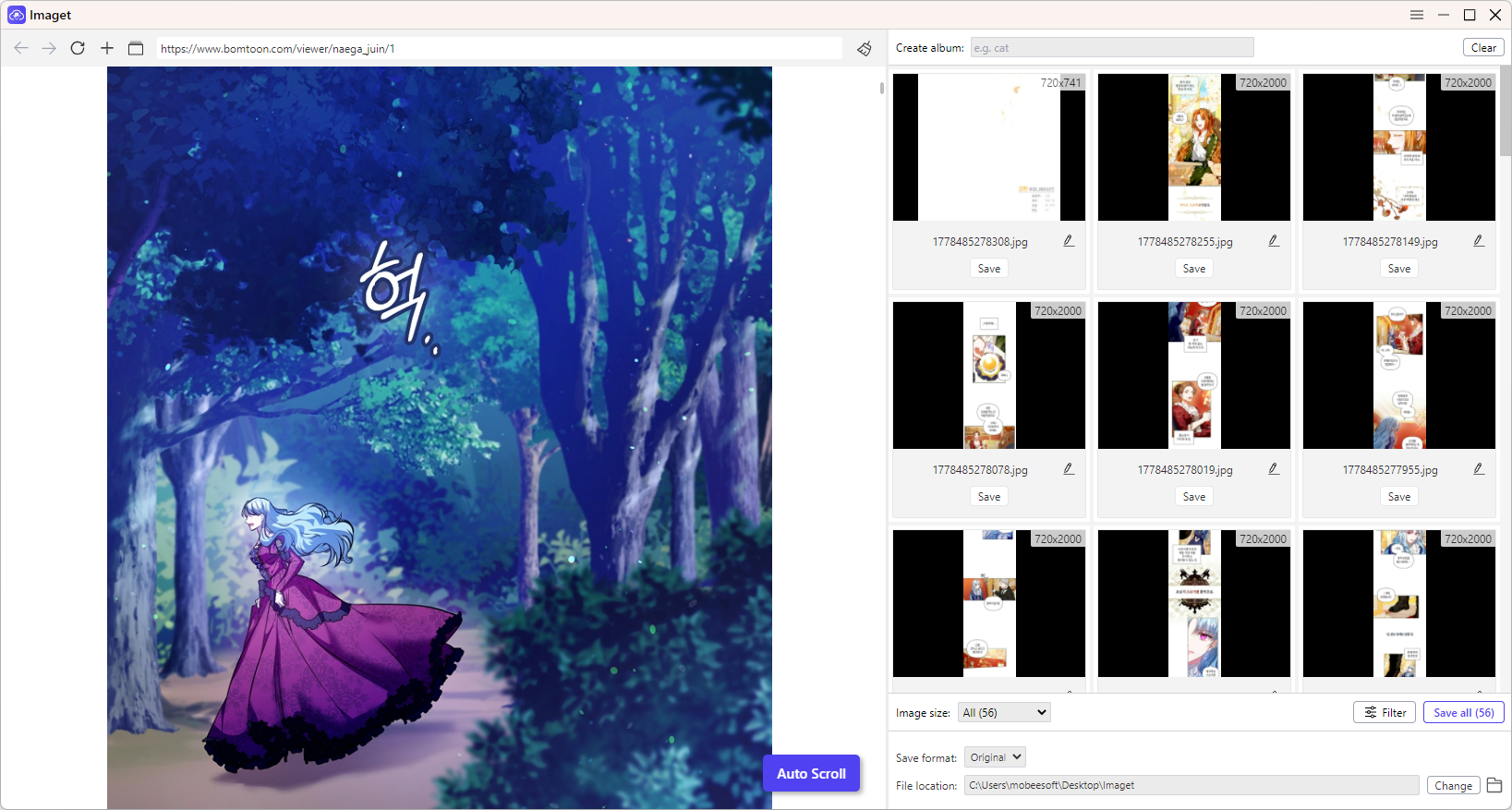
- Install and launch the appropriate version of Imaget on your computer.
- Copy the URLs of the Bomtoon chapters or series pages and paste them into Imaget.
- Let Imaget automatically analyze the Bomtoon pages and detect available manga images.
- Select the chapters or images you want, then click Save All to start the bulk download process.
5. Conclusion
There are several ways to download and save content from Bomtoon for offline reading, depending on your needs.
Browser “Save Page As” is the simplest option for saving individual chapters. Online downloaders provide quick access without installation, while browser extensions offer more convenience directly inside the browser. However, each of these methods has limitations when it comes to scale and efficiency.
For users who want a more complete and organized offline reading experience, Imaget stands out as the most powerful solution. With its bulk downloading capabilities and efficient file management, it makes building a full offline webtoon library much easier.
- Best Image Downloaders to Download Bato Manga in 2026
- How to Download Movie Screencaps from FilmGrab?
- Bulk Image Downloader Chrome Extension Overview: How to Use It for Batch Downloads
- TurboImageHost Downloader Chrome: How to Download Images Easily
- How to Download Pictures from Wildskirts?
- How to Rip Assets from Websites: 5 Easy Methods
- Best Image Downloaders to Download Bato Manga in 2026
- How to Download Movie Screencaps from FilmGrab?
- Bulk Image Downloader Chrome Extension Overview: How to Use It for Batch Downloads
- TurboImageHost Downloader Chrome: How to Download Images Easily
- How to Download Pictures from Wildskirts?
- How to Rip Assets from Websites: 5 Easy Methods
- How to Download Images from Danbooru?