How to Download Images from Gelbooru: A Complete Guide

Gelbooru is a well-known image-hosting platform featuring an extensive collection of anime artwork, manga-inspired illustrations, character pictures, and fan art. Its tag-based search system makes it easy to find images by character names, artists, themes, and other keywords. In this guide, we will explain some practical methods to download images from Gelbooru, including their advantages and limitations.
1. Manually Download Gelbooru Images
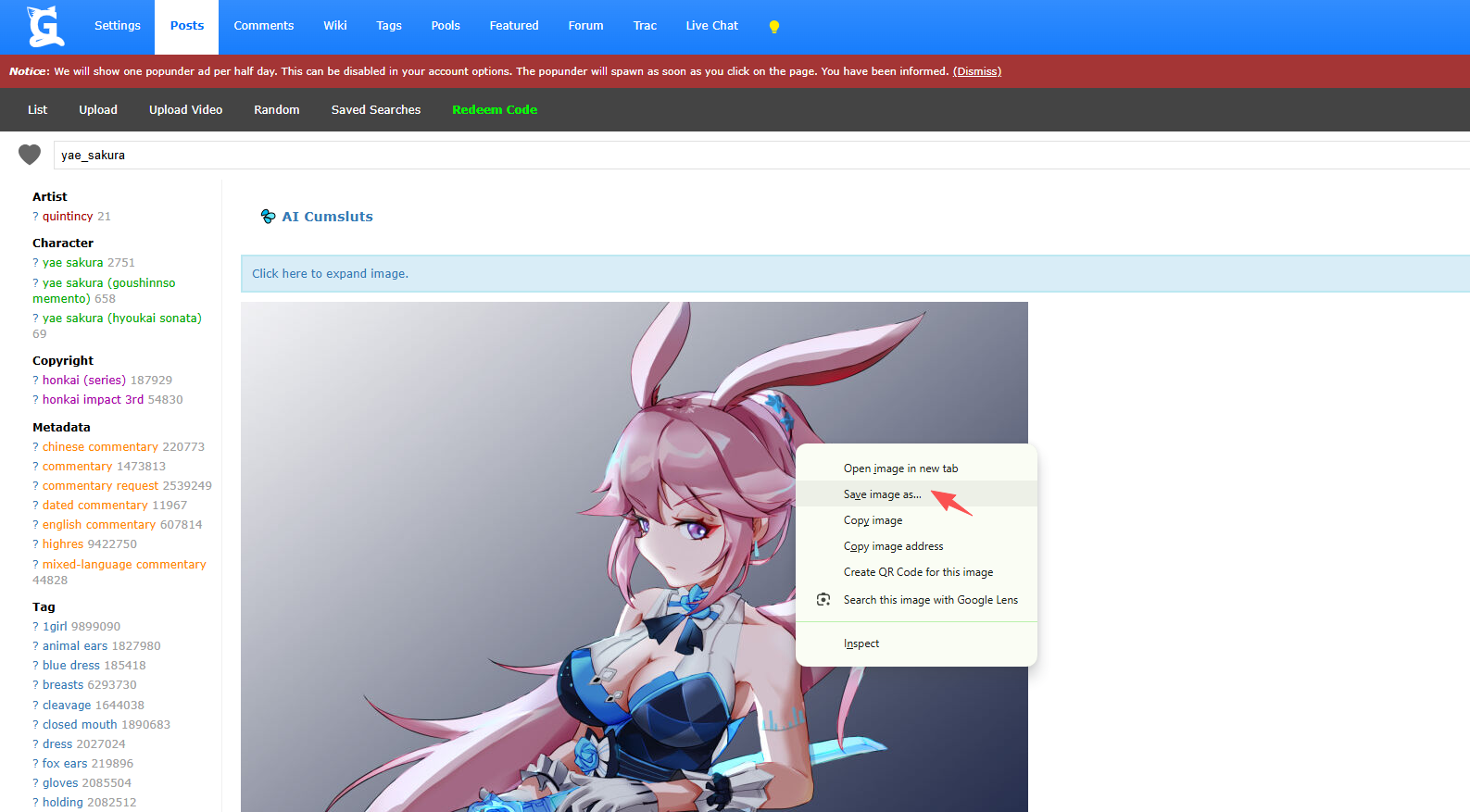
The simplest way to download images from Gelbooru is to use your browser’s built-in image-saving function. This method is suitable when you only need a few pictures and do not want to install additional software.
Steps to Download Gelbooru Images Manually:
- Visit the Gelbooru website in your browser, find the images you want and click the thumbnail to access its individual post page.
- Right-click the image and select Save image as, then choose a destination folder and save the file.
Pros:
- Free and easy to use.
- No additional software or browser extensions required.
- Allows you to inspect each image before downloading it.
- Useful for saving individual images in their available quality.
Cons:
- Repetitive when downloading many images.
- Requires manual navigation between individual posts.
- Organizing large collections can take considerable time.
- Original files may be unavailable or restricted for some posts.
2. Download Gelbooru Images with Online Downloaders
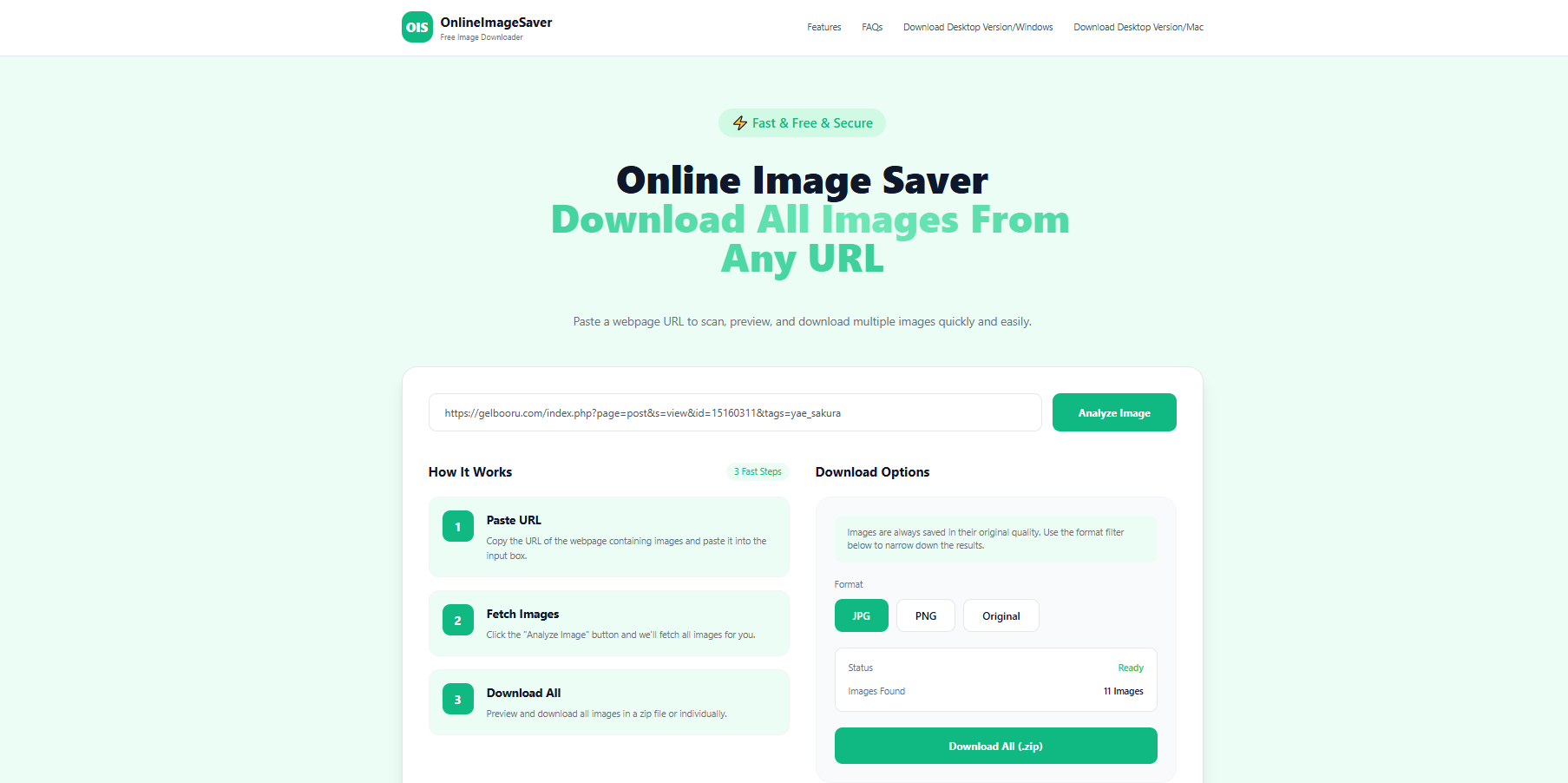
Online image downloaders offer another way to save images without installing desktop software. Depending on the service, you may be able to paste an image URL, analyze the page, preview detected images, and download selected files.
Steps to Use an Online Image Downloader to Download Gelbooru Images:
- Open Gelbooru and search for the images you need, then copy the image’s direct URL or the relevant post or page URL, depending on what the downloader supports.
- Visit a compatible image downloading service like OnlineImageSaver, paste the link into the provided input field and click the download or analysis button.
- Let the service detects downloadable images, preview the results and save the images you want.
Pros:
- Usually requires no installation.
- Can work across different operating systems and devices.
- Convenient for occasional downloads.
- Some tools provide image previews and batch selection.
Cons:
- Gelbooru compatibility varies between services.
- Many tools cannot extract every image from a search-results page.
- Batch downloading and file organization may be limited.
- Large downloads can be slow or affected by service restrictions.
- Uploading URLs to unfamiliar websites may introduce privacy or security concerns.
3. Download Gelbooru Images with Browser Extensions
Browser extensions can simplify image downloading by adding image detection or download controls directly to your browser. Some extensions scan the current webpage, identify available images, and let you select multiple files without opening each image individually.
Popular general-purpose options include Imageye, Image Downloader, and Fatkun Batch Download Image. Their features and compatibility can vary, so you may need to test which one works best with Gelbooru.
Steps to Download Gelbooru Images with an Extension:
- Find a reputable image downloader like Imageye in your browser’s official extension store and install it.
- Navigate to a search-results page containing the images you want, then click the extension icon to scan the current webpage.
- If available, use image dimensions, file types, or other filters to narrow the results.
- Choose the images you want to save. If the extension supports bulk downloading, select multiple files.
- Start the download and check your browser’s download folder.

Pros:
- Convenient for downloading images while browsing.
- Some extensions support multiple-image selection.
- Image filters can help exclude small thumbnails and irrelevant graphics.
- No need to switch between the browser and a separate desktop application.
Cons:
- Support for Gelbooru may be inconsistent.
- Some extensions download thumbnails instead of original images.
- Large batches can be difficult to manage.
- Browser permissions and extension updates may affect reliability.
4. Advanced Bulk Download Gelbooru Images with Imaget
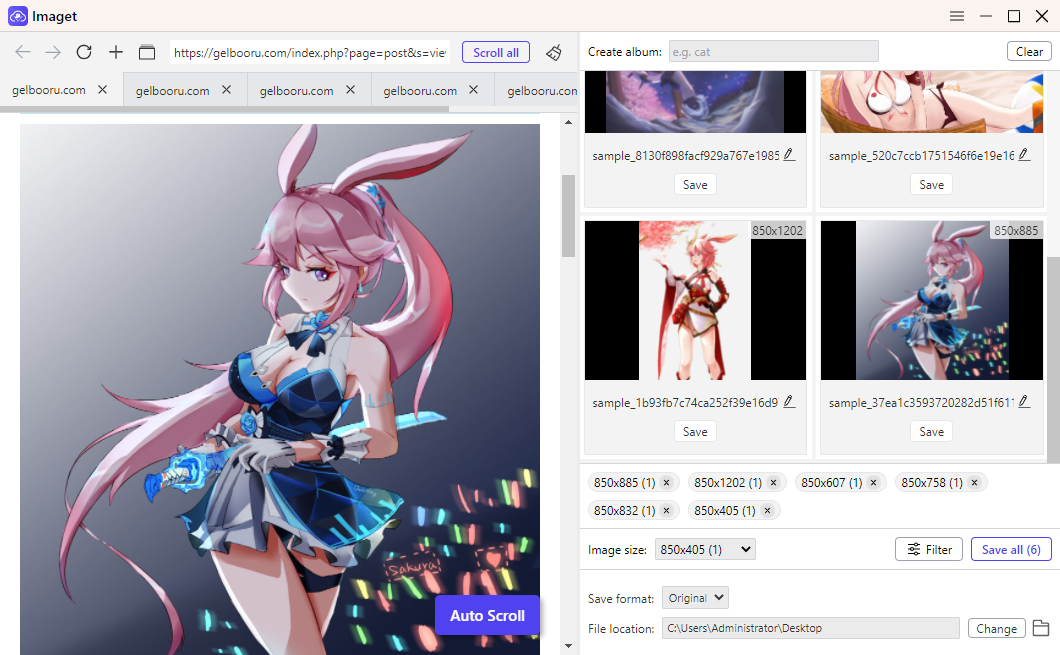
If you want to download large numbers of Gelbooru images efficiently, a dedicated bulk image downloader such as Imaget is worth considering. Rather than downloading images one by one, Imaget lets you extract and download multiple images in batches, making the process faster and more convenient.
Key features of Imaget:
- Support all image hosting websites, including Gelbooru.
- Download multiple detected images from a webpage or a list of URLs.
- Advanced filters to choose desired image types and resolutions.
- Save the highest-quality image files that are accessible and supported.
- Handle supported formats such as JPG, PNG, GIF, and WebP.
Steps to Bulk Download Gelbooru Images with Imaget:
- Download and install the Imaget desktop application on your computer.
- Copy the URLs of the Gelbooru pages that contains the images you want to download, then paste them into Imaget.
- Imaget will open and analyze these pages, displaying all the images it can access.
- Use the available filtering options to choose highest-quality Gelbooru image files.
- Set output fotmat and a destination folder, then click Sava all button to egin downloading the selected images and wait for the process to finish.
5. Conclusion
There are several ways to download images from Gelbooru, and the best method depends on how many images you need. Manual downloading is ideal for a few pictures, online downloaders are convenient for simple tasks, and browser extensions can help save multiple images directly from a webpage.
However, if you frequently collect images from numerous pages or need to manage large batches, Imaget is our recommended option for advanced bulk image downloading. Its image detection, preview, filtering, and batch-saving workflow can make collecting and organizing images much more efficient than downloading them individually.
Try Imaget if you want a more streamlined way to manage your Gelbooru image collections and other supported image sources.
- Best Image Downloaders to Download Bato Manga in 2026
- How to Download Movie Screencaps from FilmGrab?
- Bulk Image Downloader Chrome Extension Overview: How to Use It for Batch Downloads
- TurboImageHost Downloader Chrome: How to Download Images Easily
- How to Download Pictures from Wildskirts?
- How to Rip Assets from Websites: 5 Easy Methods
- Best Image Downloaders to Download Bato Manga in 2026
- How to Download Movie Screencaps from FilmGrab?
- Bulk Image Downloader Chrome Extension Overview: How to Use It for Batch Downloads
- TurboImageHost Downloader Chrome: How to Download Images Easily
- How to Download Pictures from Wildskirts?
- How to Rip Assets from Websites: 5 Easy Methods