How to Download Manga from Webtoon?

Webtoon has become one of the most popular platforms for reading digital comics and manga-style stories. With its vertical scrolling format, high-quality artwork, and frequent updates, it offers a smooth reading experience across genres like romance, action, fantasy, and horror. However, many readers want to save their favorite Webtoon chapters for offline viewing, backup, or personal collection.
Since Webtoon does not provide a built-in download feature for most content, users often rely on third-party tools and methods to save images or entire chapters. In this article, we will explore practical ways to download manga from Webtoon, including desktop software, web archiving tools, browser extensions, and online downloaders.
Top 1 Method: Using Imaget
One of the most effective and reliable tools for downloading manga from Webtoon is Imaget, a powerful image and gallery downloader designed to capture multiple images from web pages quickly and efficiently.
Imaget stands out because it is built specifically for bulk image downloading, making it ideal for Webtoon chapters that consist of multiple vertically stacked images.
Key Features of Imaget:
- Detect all original quality images from a Webtoon chapter in one click
- Supports batch downloading for multiple pages or tabs
- Automatically detects high-resolution images
- Filters images by size or type before downloading
- Export images in popular WebP/JPG/PNG formats
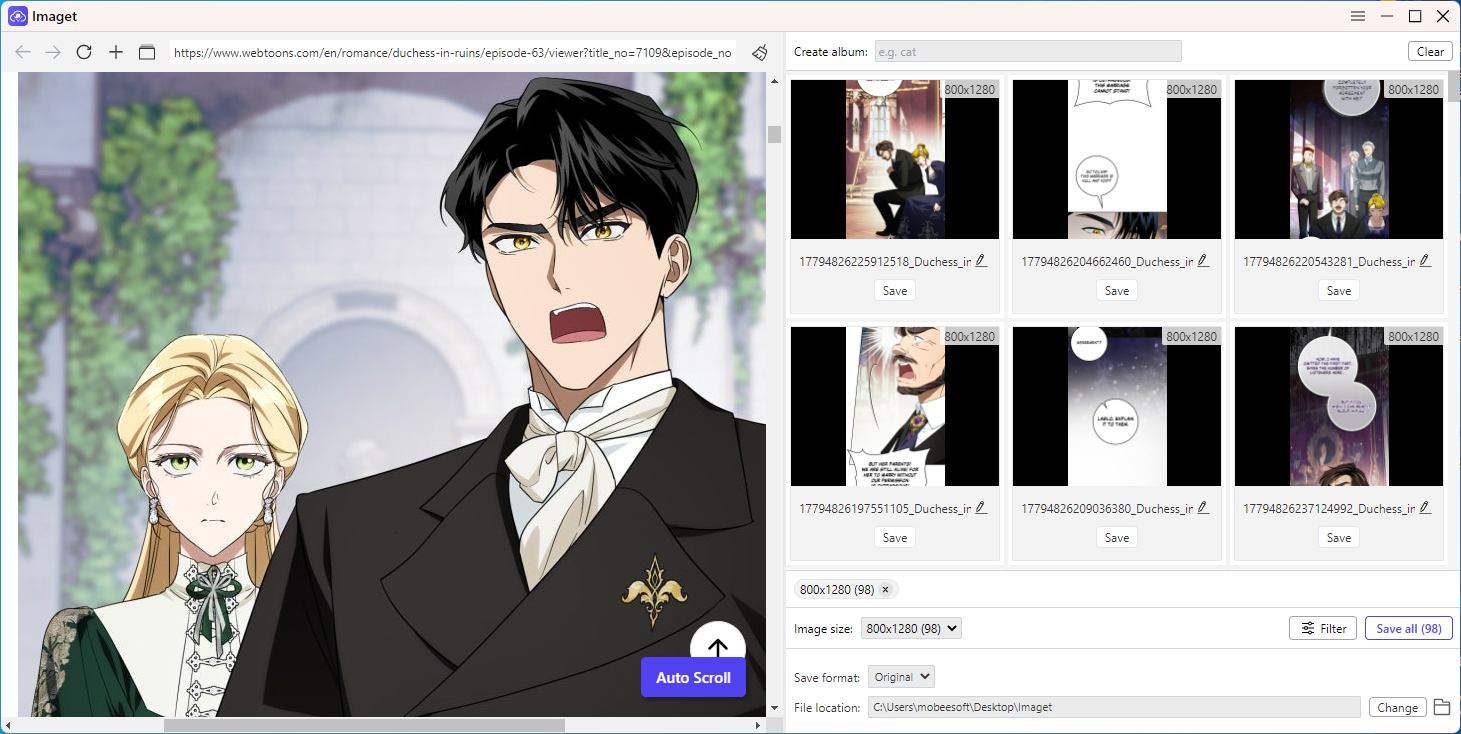
How to use Imaget to download from Webtoon:
- Install and launch Imaget on your computer.
- Open the Webtoon chapter you want to download inside Imaget, then let the tool scan and detect all images on the page.
- Select the desired Webtoon images or full chapter by image size and type.
- Choose output format and file location, then click “Save all” to download them locally.
Top 2 Method: Using Web Archiver – Swyshare ArchiveKit
Another effective method is using a web archiving tool such as Swyshare ArchiveKit, which allows users to capture and preserve entire web pages, including images, layouts, and structure.
Key Features of ArchiveKit:
- Saves full Webtoon pages offline
- Captures images, text, and layout structure
- Works as a browser-based archiving solution
- Supports exporting pages into local files
- Useful for long-term content storage
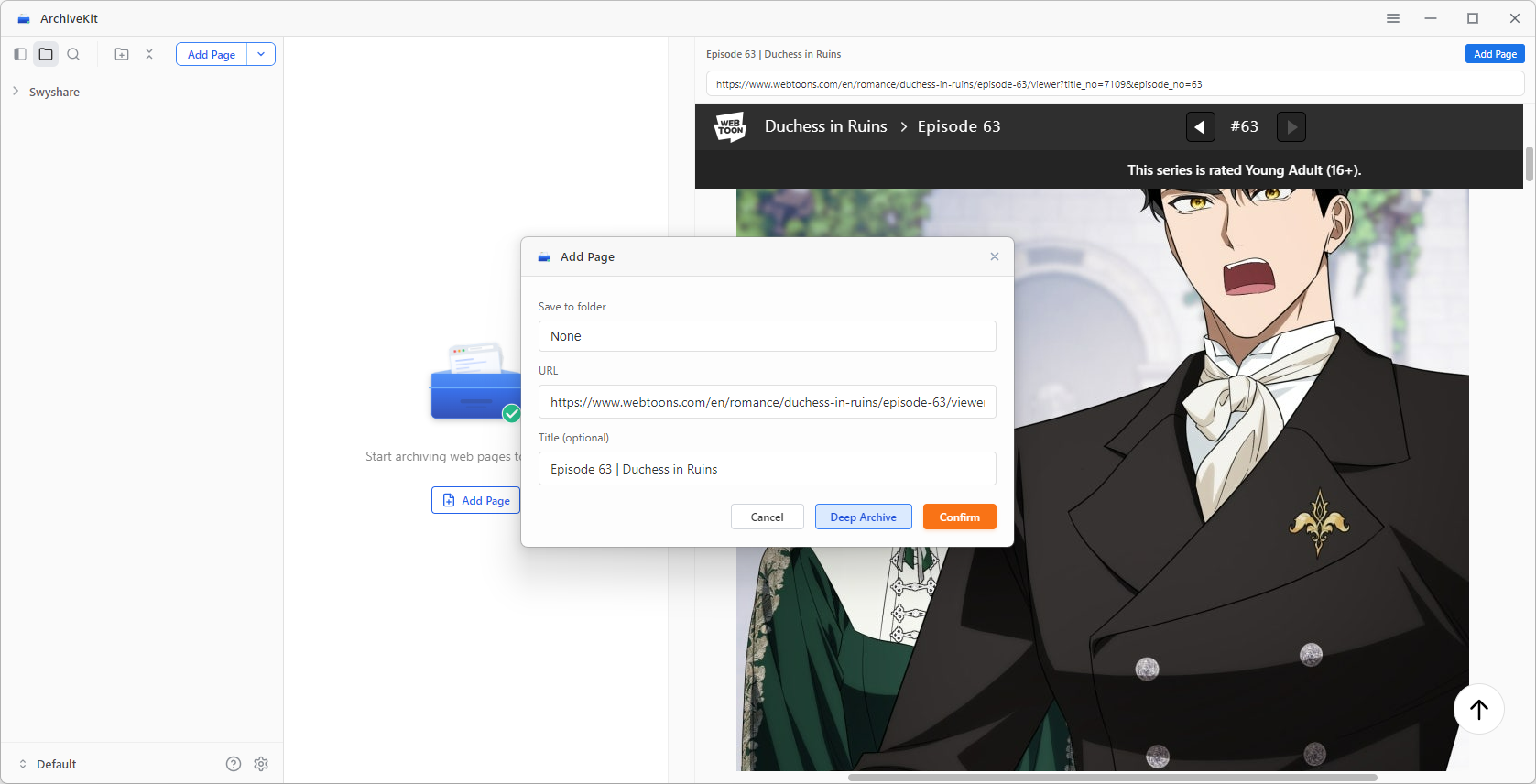
How to use ArchiveKit to save Webtoon page:
- Install Swyshare ArchiveKit extension or software
- Copy the link of the Webtoon chapter in your browser, then open it with ArchiveKit’s Live Browser mode.
- Scroll the page to load full content, then click “Add Page” and select “Deep Archive”.
- ArchiveKit will save the page, then you can open the saved Webtoon page offline anytime.
Limitations:
A web archiver saves the entire webpage instead of just the manga images, resulting in larger files and limited image extraction and organization features.
Top 3 Method: Using Image Downloader Extensions
Browser extensions are another popular way to download Webtoon images. Tools like image downloader extensions for Chrome or Firefox allow users to extract images directly from web pages.
Popular choices:
- HImage
- Imageye
- Image Downloader Pro
How to use image downloader extensions to download from Webtoon:
- Install an image downloader extension like HImage from the browser store.
- Open the Webtoon chapter, click the extension icon and let it scan all images on the page.
- Select the images you want to download, then save them to your device.

Limitations:
While convenient, extensions may not always detect all images correctly, especially in long scrolling Webtoon pages where images are dynamically loaded.
Top 4 Method: Using Online Image Downloaders
Online image download tools are another option for users who do not want to install software or extensions. These websites allow you to paste a URL and extract images directly.
Popular choices:
- Image Extractor
- ImgDownloader
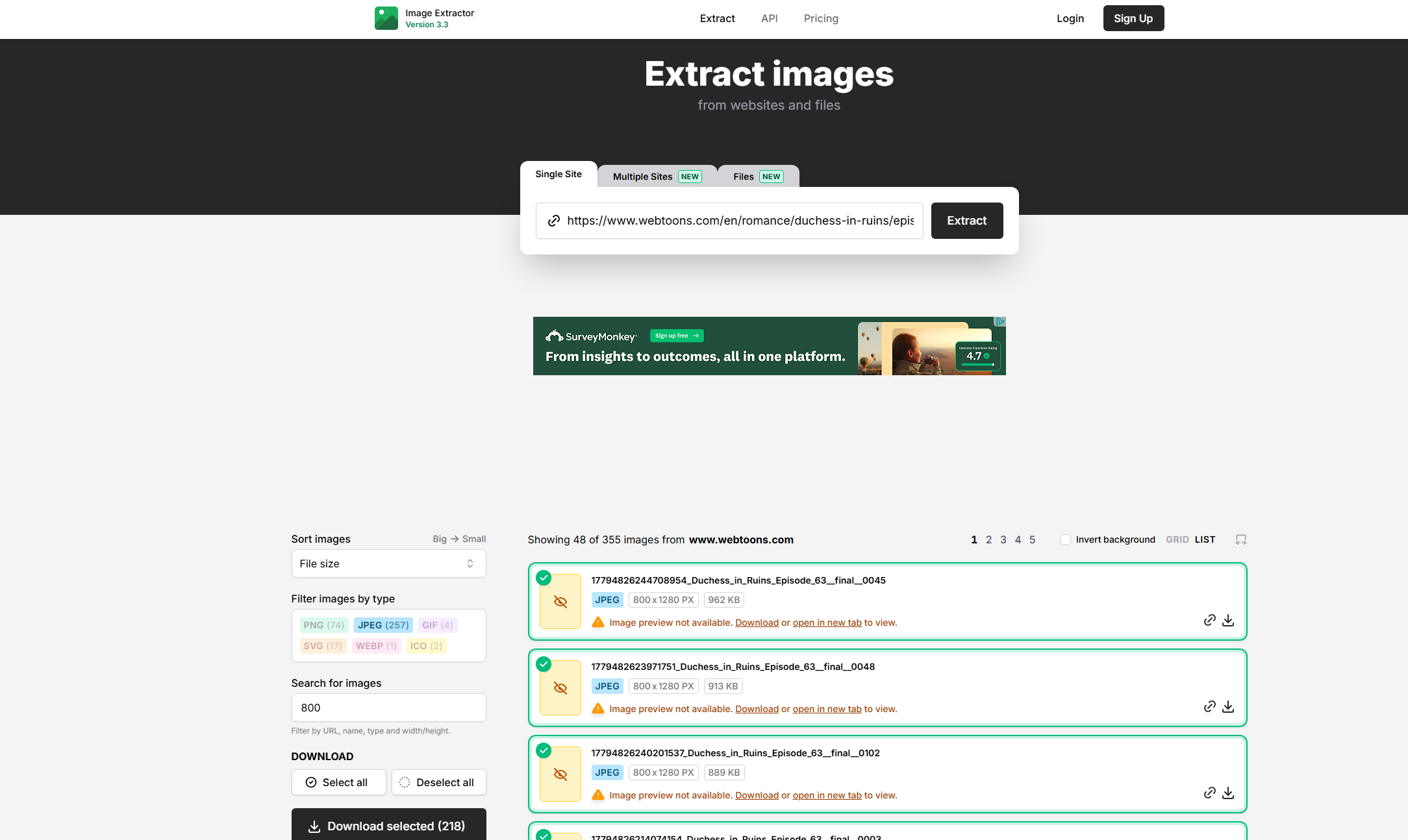
How to use an online image downloader to download from Webtoon:
- Open an online image downloader website like https://extract.pics/.
- Paste the Webtoon chapter URL and start the extraction process
- Preview and select detected Webtoon images, then download them as a .zip file.
Limitations:
Online tools are usually less powerful than desktop software. They may fail with large Webtoon chapters, and some may not support dynamic or protected content.
5. Conclusion
Downloading manga from Webtoon can be done in several ways, depending on your needs and technical comfort level. Browser extensions and online tools are quick and convenient, while web archivers like Swyshare ArchiveKit provide a more complete preservation of content.
However, the most efficient and reliable method is using Imaget. It offers fast batch downloading, high-quality image extraction, and a simple workflow that makes saving Webtoon chapters effortless. If you are looking for a stable and powerful solution for building an offline manga collection, Imaget is the best choice overall.
- Best Image Downloaders to Download Bato Manga in 2026
- How to Download Movie Screencaps from FilmGrab?
- Bulk Image Downloader Chrome Extension Overview: How to Use It for Batch Downloads
- TurboImageHost Downloader Chrome: How to Download Images Easily
- How to Download Pictures from Wildskirts?
- How to Rip Assets from Websites: 5 Easy Methods
- Best Image Downloaders to Download Bato Manga in 2026
- How to Download Movie Screencaps from FilmGrab?
- Bulk Image Downloader Chrome Extension Overview: How to Use It for Batch Downloads
- TurboImageHost Downloader Chrome: How to Download Images Easily
- How to Download Pictures from Wildskirts?
- How to Rip Assets from Websites: 5 Easy Methods
- How to Download Images from Danbooru?