How to Download Reddit Group Profile Photos?

Reddit is home to millions of communities, also known as subreddits or Reddit groups. Each subreddit usually has its own profile photo, icon, or banner image that helps represent the community’s identity. Whether you want to save a subreddit logo for inspiration, archive a community page, collect reference images, or simply keep a copy offline, there are several easy ways to download Reddit group profile photos.
In this guide, you’ll learn different methods to download Reddit group profile pictures on desktop and mobile devices, including both basic advanced bulk downloading solutions.
1. What Is a Reddit Group Profile Photo?
A Reddit group profile photo is the icon or avatar displayed next to a subreddit name. For example, communities like Reddit subreddits often use custom logos, illustrations, or branded icons to visually identify their group.
These images can appear in different forms, including:
- Subreddit icons
- Community avatars
- Header banners
- Cover images
- Custom artwork
Some subreddit images are publicly accessible, while others may require login access if the community is private or restricted.
2. Why Download Reddit Group Profile Photos?
People download subreddit profile images for many reasons, such as:
- Saving design inspiration
- Archiving online communities
- Creating mood boards
- Collecting meme or fandom artwork
- Offline viewing
- Social media research
- Graphic design references
Since Reddit images can sometimes be updated or removed, downloading them ensures you keep a local copy.
3. How to Download Reddit Group Profile Photos?
Method 1: Download Reddit Group Profile Photos Directly
The easiest way to save a Reddit group profile photo is by downloading it manually from your browser.
Steps:
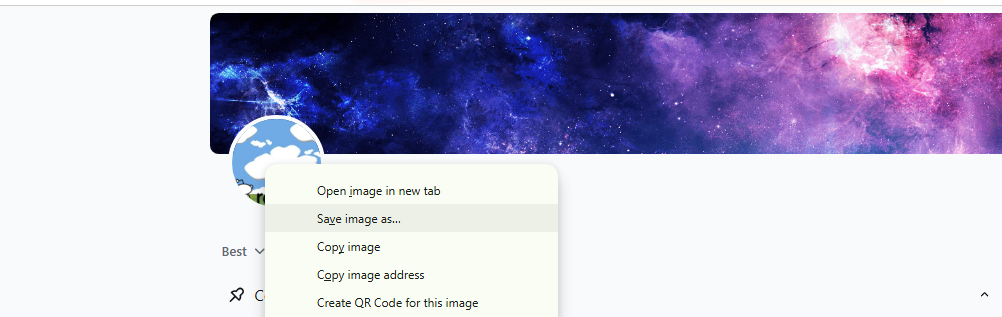
- Open Reddit in your browser and visit the subreddit page.
- Click the subreddit icon or avatar, choose “Save image as…”, then select a folder and save the image.
Method 2: Use Browser Developer Tools
Sometimes Reddit loads profile photos dynamically, making direct saving difficult. In this case, browser developer tools can help you locate the original image URL.
Steps:
- Open the subreddit page in Chrome or Firefox, then press F12 to open Developer Tools.
- Select the image inspection tool, click the subreddit profile image and find the image URL in the HTML code.
- Open the image URL in a new tab and save the image normally.
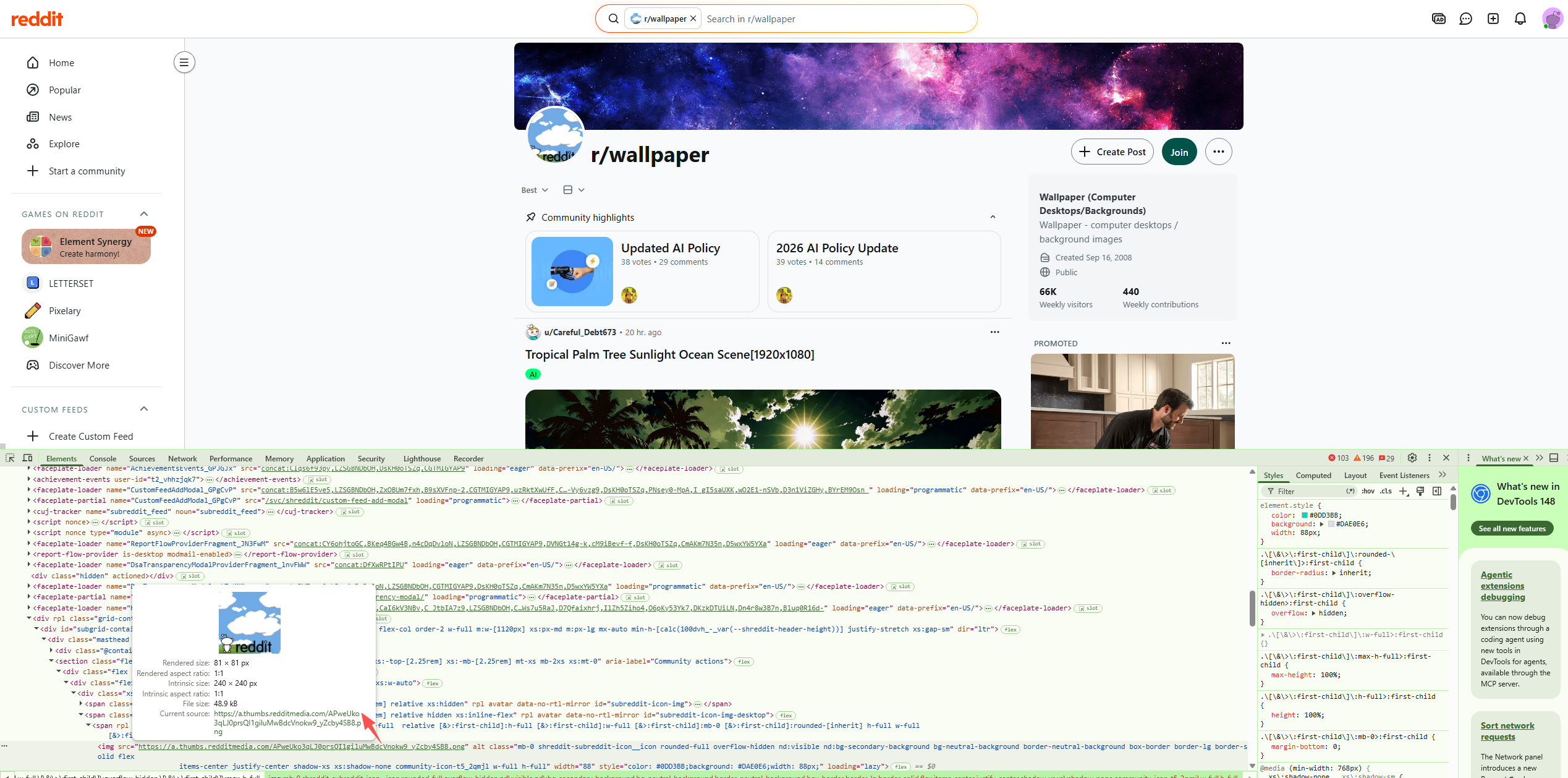
This method is useful for extracting higher-resolution profile images.
Method 3: Use Online Reddit Image Downloaders
Several online tools can help download Reddit images without installing software. These tools usually work by pasting the Reddit page URL.
Popular downloader websites often support:
- Reddit avatars
- Reddit banners
- Reddit gallery images
- Reddit videos and thumbnails
How to Use:
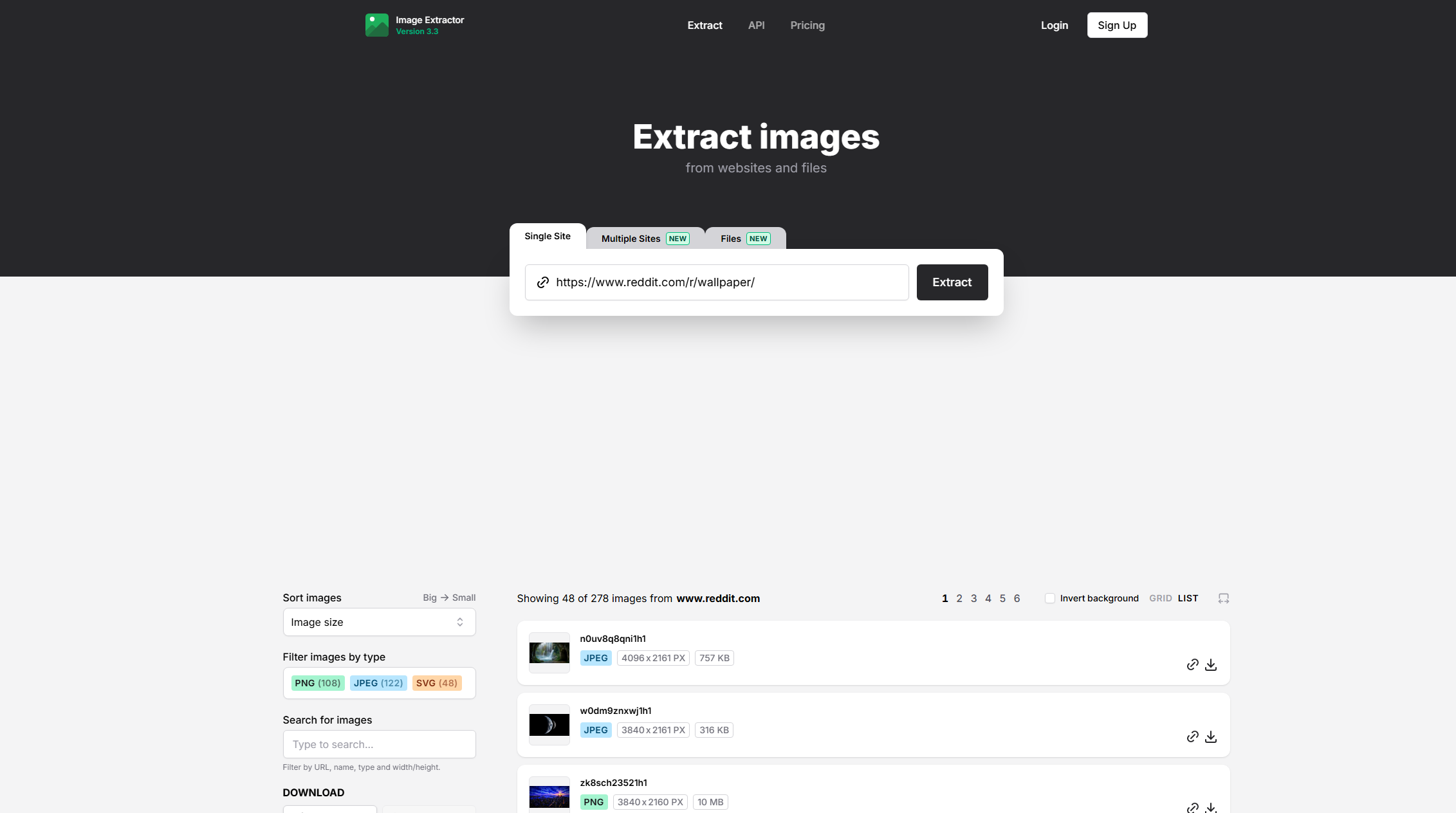
- Copy the subreddit URL that you want to download photos from.
- Open the downloader website and paste the URL into the input box.
- Click download or fetch, then save the extracted image.
Method 4: Use Browser Extensions
Browser extensions provide a more convenient way to download Reddit profile photos and media directly while browsing.
Extensions can add:
- One-click image saving
- Bulk image downloading
- Automatic media detection
- Higher-resolution extraction
Common browser extensions support Chrome, Edge, and Firefox.
Steps:
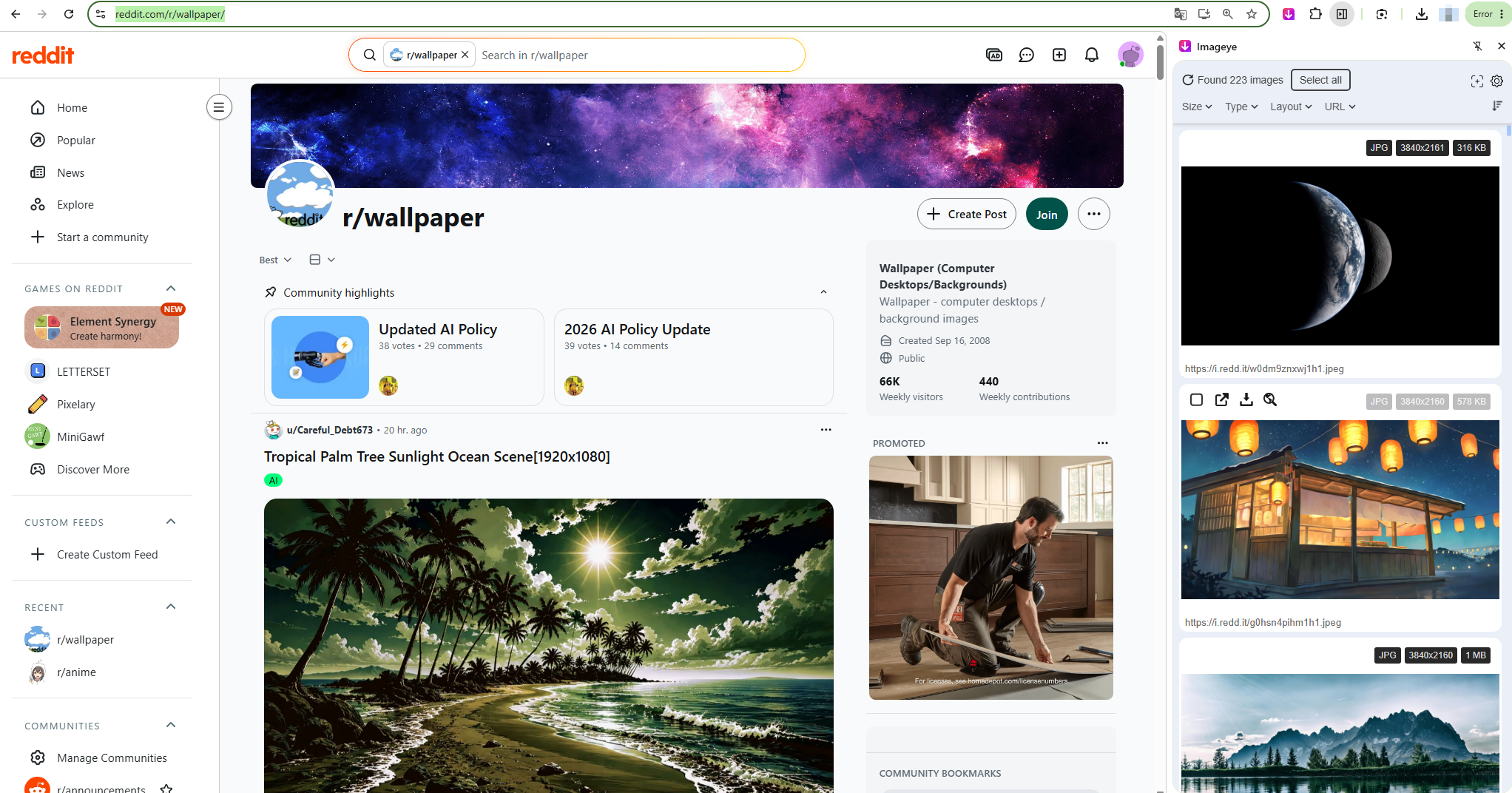
- Install an image downloader extension on Chrome, Edge, or Firefox.
- Open the target Reddit subreddit page, scroll to load full page.
- Click the browser extension icon to scan webpage images.
- Filter images by size or format to find the subreddit avatar.
- Click Download to save the Reddit group profile image to your device.
Method 5: Bulk Download Reddit Group Profile Photos with Imaget
If you need to download multiple Reddit group profile and other photos in bulk, using a professional bulk image downloader is much more efficient.
Imaget is a powerful bulk image downloader designed to help users save images from websites, galleries, and social platforms in high quality. It supports downloading multiple images simultaneously and can detect hidden or dynamically loaded images automatically.
Key Features of Imaget:
- Bulk download images from multiple webpages at once
- Automatically detect and save images in original resolution and quality
- Filter images by file type, size, and resolution for precise selection
- Download banners, icons, and full galleries in one batch
- Compatible with both Windows and Mac systems
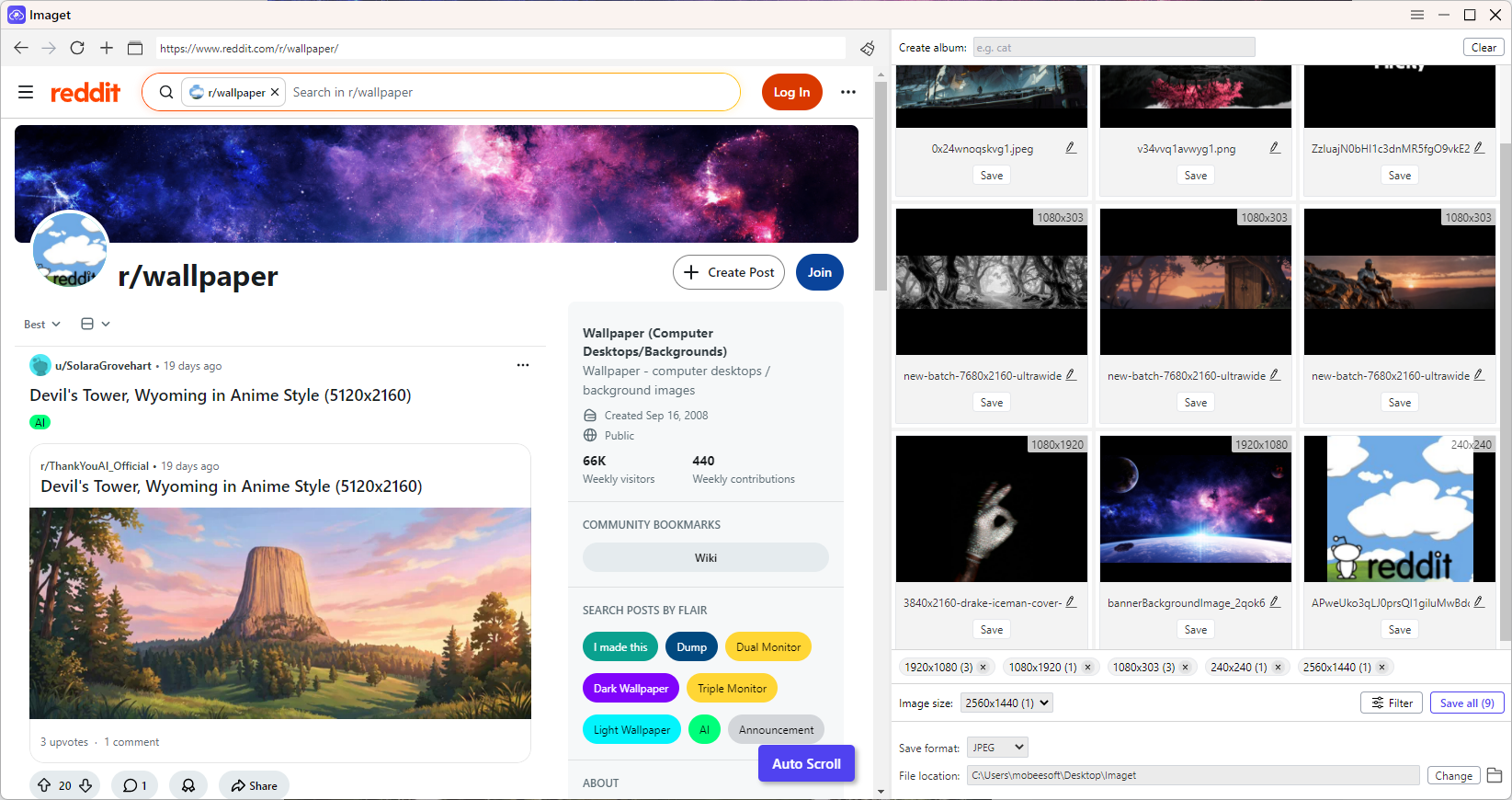
How to download all Reddit photos with Imaget:
- Install and launch Imaget on Windows or Mac.
- Copy and paste the Reddit subreddit URLs into Imaget’s built-in browser, then let Imaget scan and detect all available photos automatically.
- Filter by resolution/file type and set output format and file location if needed.
- Click “Save all” to download all selected Reddit photos in bulk to your device.
4. Conclusion
Reddit is made up of millions of communities, each with its own profile photo, icon, or banner that represents its identity. Whether you want to save inspiration, archive subreddit pages, or collect reference images, downloading Reddit group profile photos can be very useful.
As shown in this guide, there are several ways to do it. You can manually save images, use browser developer tools, try online downloaders, or install browser extensions for quicker access. These methods are suitable for single or occasional downloads.
For users who need to download multiple images at once or want higher efficiency, bulk downloading tools offer a better solution. For example, Imaget can automatically detect and save Reddit images in original quality, making the process faster and easier.
- Best Image Downloaders to Download Bato Manga in 2026
- How to Download Movie Screencaps from FilmGrab?
- Bulk Image Downloader Chrome Extension Overview: How to Use It for Batch Downloads
- TurboImageHost Downloader Chrome: How to Download Images Easily
- How to Download Pictures from Wildskirts?
- How to Rip Assets from Websites: 5 Easy Methods
- Best Image Downloaders to Download Bato Manga in 2026
- How to Download Movie Screencaps from FilmGrab?
- Bulk Image Downloader Chrome Extension Overview: How to Use It for Batch Downloads
- TurboImageHost Downloader Chrome: How to Download Images Easily
- How to Download Pictures from Wildskirts?
- How to Rip Assets from Websites: 5 Easy Methods
- How to Download Images from Danbooru?