How to Download Google Photos Without Losing Metadata?

Google Photos is one of the most popular platforms for storing, organizing, and managing digital memories. It allows users to back up thousands of photos and videos while keeping important information such as capture dates, camera details, locations, and album organization. However, when downloading photos from Google Photos, many users worry about losing metadata. This information is valuable for photographers, researchers, content creators, and anyone who wants to maintain a well-organized photo archive.
Fortunately, there are several ways to download Google Photos while keeping metadata intact. This guide explains the best methods to export Google Photos without losing important information, now let’s live in.
1. How to Download Google Photos Without Losing Metadata?
Method 1: Use Google Takeout to Export Photos
The most recommended method for downloading Google Photos while preserving metadata is using Google Takeout, Google’s official data export service.
Google Takeout allows users to export their entire Google Photos library or selected albums. Instead of downloading compressed copies through a browser, it creates an archive containing the original photos and related metadata files.
Steps to download Google Photos with Google Takeout:
- Visit the Google Takeout website and sign in with your Google account.
- Click Deselect all to remove unnecessary Google services.
- Find and select Google Photos.
- Choose whether to export:
- All photo albums
- Selected albums only
- Click Next step.
- Select export settings:
- Export type: One-time export
- File format: ZIP
- Maximum file size: Select a preferred limit based on your storage capacity
- Click Create export.
- Wait for Google to prepare your archive.
- Download and extract the ZIP files.
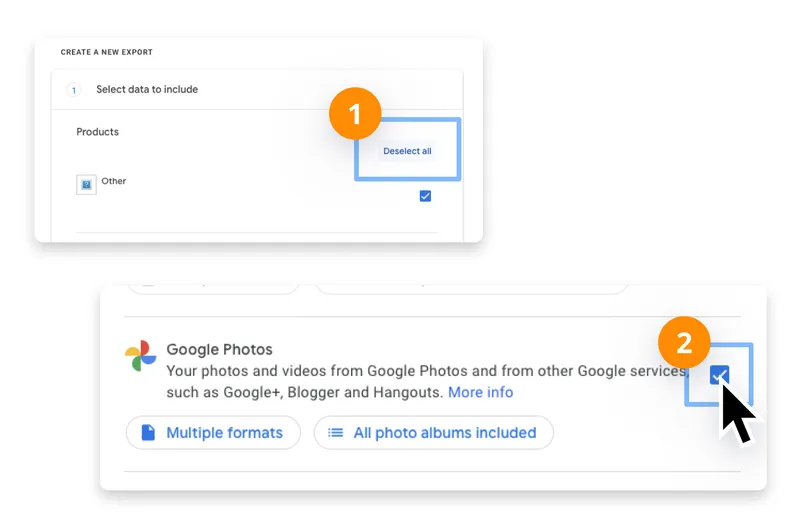
After extraction, you will find your photos and videos along with JSON metadata files. These JSON files contain additional information that may not be embedded directly into the image files, including descriptions, album details, and Google Photos-specific information.
Advantages of Google Takeout:
- Official Google export method
- Supports large photo libraries
- Keeps original photo and video files
- Includes additional metadata files
- Works for complete backups
However, Google Takeout has some limitations. Large libraries may require multiple ZIP files, and organizing thousands of exported files can take time. The metadata is also sometimes stored separately in JSON files, meaning additional tools may be required if you want to merge metadata back into the image files.
Method 2: Download Photos Directly from Google Photos
For users who only need to download a small number of photos, downloading directly from Google Photos is a simple option.
Steps:
- Open Google Photos in your web browser.
- Select the photos you want to download.
- Right click on the Google photo and choose Save images as…
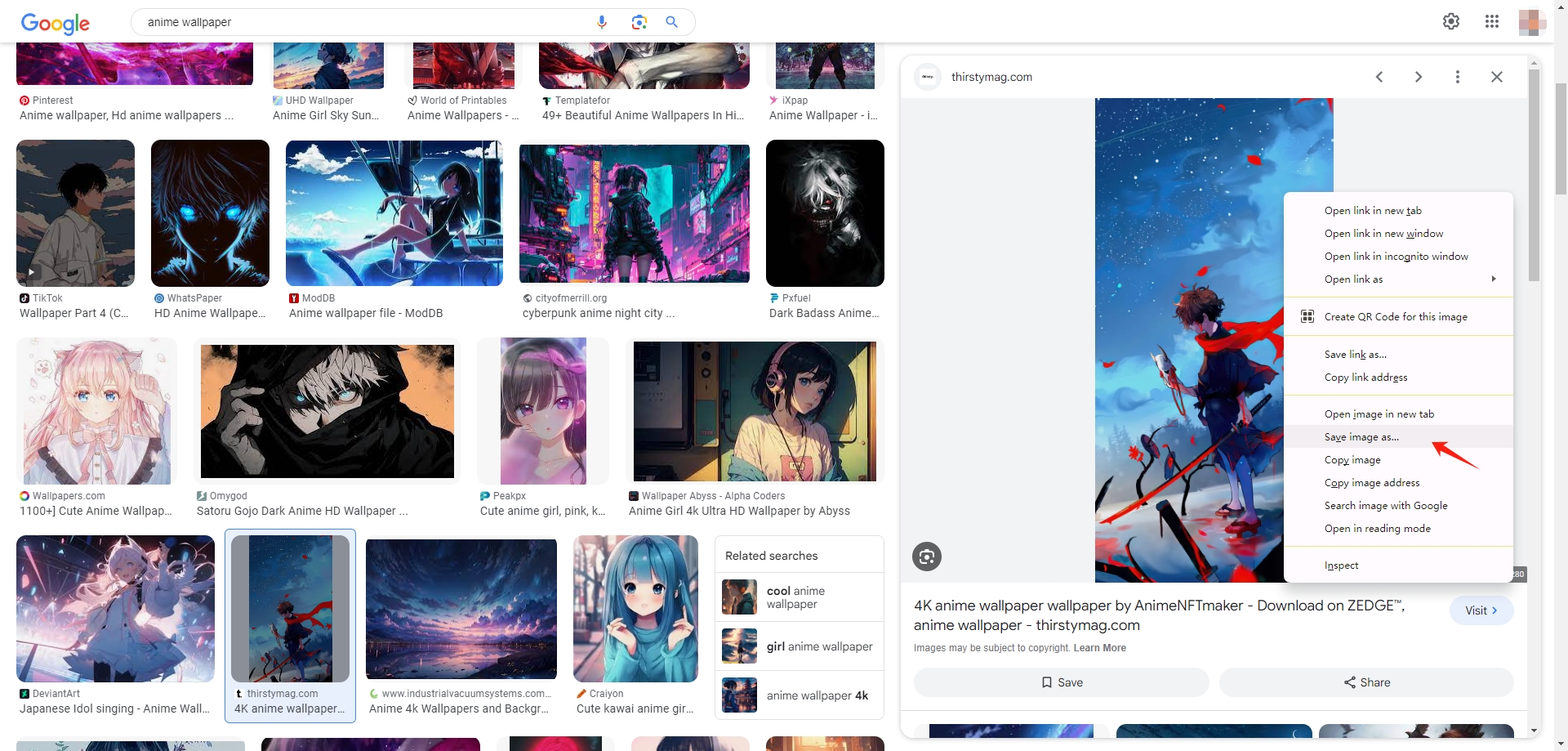
This method usually downloads the original image files and keeps basic metadata such as capture date and camera information. However, it is not ideal for large collections because selecting thousands of photos manually can be time-consuming.
Potential issues include:
- Limited batch download capability
- Difficulty maintaining album structures
- Possible separation of some metadata
- Manual organization after downloading
For a few images, direct downloading works well. For large libraries, a dedicated bulk downloader provides a more efficient solution.
Method 3: Keep and Restore Google Photos Metadata
When exporting Google Photos, users should always keep the accompanying JSON files. These files contain metadata that may not appear inside the downloaded images.
If some metadata is missing, tools like ExifTool can help transfer information from JSON files back into photos.
Metadata that can often be preserved includes:
- Original creation date
- Location information
- Photo descriptions
- Camera details
- File organization information
Keeping these metadata files is especially important for photographers, archivists, and professionals who rely on accurate photo information.
2. Advanced Bulk Download Google Photos Without Losing Metadata Using Imaget
For users with large Google Photos libraries, manually downloading files or managing Google Takeout archives can be inconvenient. An advanced bulk photo downloader such as Imaget provides a faster way to save large numbers of images while maintaining original quality and file information.
Key features of Imaget:
- Batch download images from all image hosting websites.
- Built-in browser for accessing and downloading images directly.
- Automatic image detection to find downloadable photos quickly.
- Download original-quality images without screenshots or compression.
- Support multiple URLs for efficient bulk downloading.
- Filters to choose desired images by size and type.
How to download Google photos without losing metadata using Imaget:
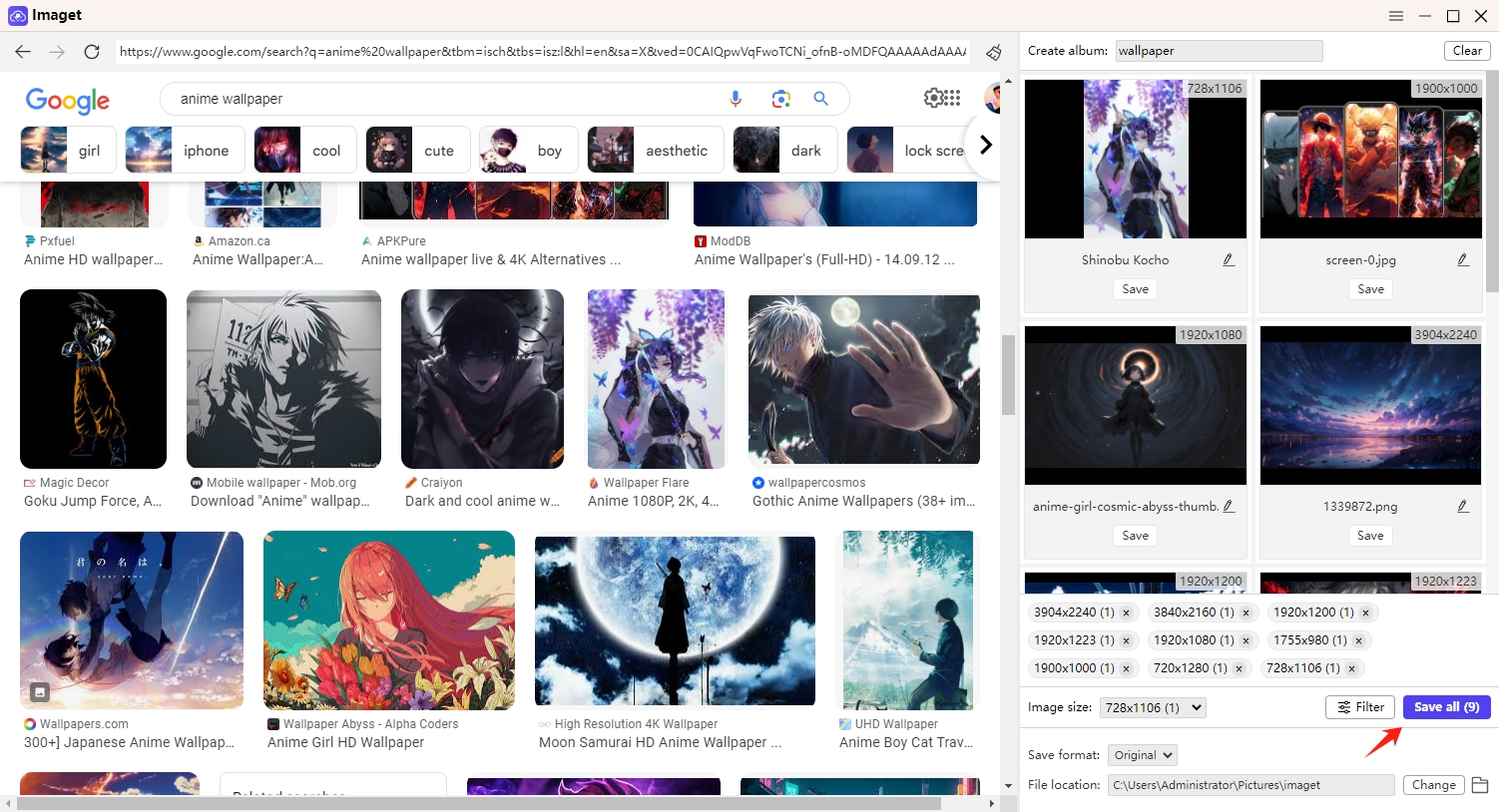
- Install and launch Imaget on your computer.
- Open Google Photos through Imaget’s built-in browser and sign in.
- Navigate to the photos or albums you want to save, then let Imaget automatically detect available images.
- Select download settings and click “Save all” to start the batch download.
- Check the downloaded files and keep original metadata whenever available.
3. Conclusion
Downloading Google Photos without losing metadata is important for preserving memories, maintaining professional photo archives, and keeping files properly organized. Google Takeout remains the official method for exporting Google Photos because it provides original files and metadata records. For smaller collections, direct downloads may also be sufficient.
However, managing thousands of photos manually can be slow and complicated. For users who need a faster and more convenient way to download large photo collections, Imaget provides an advanced bulk downloading solution. With features such as automatic image detection, batch downloads, built-in browsing, and flexible file management, Imaget makes it easier to save Google Photos efficiently while keeping your valuable photo information organized.
Whether you are backing up personal memories, managing photography projects, or building a digital archive, using a powerful bulk downloader like Imaget can simplify the process and help ensure your photos remain accessible for years to come.
- Why Can't I Download Images from Google Anymore?
- How to Download Images from Gelbooru: A Complete Guide
- Best Image Downloaders to Download Bato Manga in 2026
- How to Download Movie Screencaps from FilmGrab?
- Bulk Image Downloader Chrome Extension Overview: How to Use It for Batch Downloads
- TurboImageHost Downloader Chrome: How to Download Images Easily
- Why Can't I Download Images from Google Anymore?
- How to Download Images from Gelbooru: A Complete Guide
- Best Image Downloaders to Download Bato Manga in 2026
- How to Download Movie Screencaps from FilmGrab?
- Bulk Image Downloader Chrome Extension Overview: How to Use It for Batch Downloads
- TurboImageHost Downloader Chrome: How to Download Images Easily
- How to Download Pictures from Wildskirts?