Why Won’t Pinterest Let Me Download Images? Reasons and Solutions

Pinterest is a popular platform for discovering and saving visual content, including photos, wallpapers, illustrations, fashion ideas, and creative inspiration. Although Pinterest allows users to save Pins to their personal boards, downloading images directly to a computer or mobile device doesn’t always work as expected. You may find that the download option is missing, an image won’t load, or a download suddenly fails.
In this article, we’ll explain the common reasons Pinterest won’t let you download images, share practical solutions, and introduce an efficient tool for bulk downloading Pinterest images.

1. Why Won’t Pinterest Let Me Download Images?
If you’re having trouble downloading Pinterest images, one or more of the following reasons may be responsible:
- Download Restrictions: Some Pins may not have a direct download option because of content settings or platform restrictions.
- Copyright Protection: Certain images may be protected by copyright, and their creators may restrict unauthorized downloading or reuse.
- Outdated Pinterest App: An older app version may contain bugs or compatibility issues that affect downloading.
- Browser Problems: Corrupted cache files, cookies, or browser extensions may interfere with Pinterest’s download functionality.
- Poor Internet Connection: An unstable network can prevent images from loading properly or interrupt downloads.
- Insufficient Device Storage: Your phone or computer may not have enough free space to save additional images.
- Permission Issues: Pinterest may not have the necessary photo or storage permissions on your device.
- Pinterest Server Errors: Temporary technical problems on Pinterest’s servers may affect image loading and downloading.
Identifying the possible cause will make it easier to choose the right troubleshooting method.
2. How to Resolve Pinterest Won’t Let Me Download Images?
If Pinterest won’t let you download images, try these solutions one by one.
1) Check the Pin’s Download Options
Open the Pinterest Pin you want to save, click or tap the three-dot menu, and look for the Download image option. If it’s available, select it to save the image. If the option is missing, the Pin may not support direct downloading. Check whether the creator provides an authorized external download link.
2) Update the Pinterest App
An outdated Pinterest app may cause unexpected downloading problems. Open the Google Play Store or App Store, update Pinterest to the latest version, restart the app, and try downloading the image again.
3) Clear Browser Cache and Cookies
If you’re using Pinterest in a browser, accumulated cache and cookies may interfere with its functionality. In Chrome, open Settings > Privacy and security > Delete browsing data, select Cached images and files, clear the data, then reopen Pinterest and try downloading the image again.
4) Check Your Internet Connection
A weak or unstable internet connection can interrupt image downloads. Try switching between Wi-Fi and mobile data, restarting your router, or reconnecting to your network. Once your connection is stable, refresh Pinterest and try again.
5. Check Device Storage
Insufficient storage space may prevent Pinterest images from being saved. Check your available storage and remove unnecessary files, photos, or applications if needed. Make sure you have enough free space before attempting another download.
6) Review App Permissions
Pinterest may be unable to save images if it doesn’t have the required device permissions.
- Android: Go to Settings > Apps > Pinterest > Permissions and review the available photo and video permissions.
- iPhone: Go to Settings > Apps > Pinterest and check its Photos permissions.
Adjust the settings if necessary, then restart Pinterest.
7) Disable Conflicting Browser Extensions
Some browser extensions, especially privacy tools, ad blockers, and download managers, may interfere with Pinterest. Temporarily disable suspicious extensions and reload the Pinterest page. If downloading works afterward, enable extensions individually to identify the conflict.
8) Try Another Browser or Device
If the problem continues, open Pinterest in another browser, such as Firefox or Microsoft Edge. You can also try another device. If downloading works elsewhere, the issue is likely related to your original browser or device configuration.
9) Check Pinterest Service Status
Sometimes, Pinterest experiences temporary server problems that affect its features. Check Pinterest’s official support resources or service updates. If there’s an ongoing issue, wait until the service is restored before trying again.
3. Bonus: Bulk Download Pinterest Images with Imaget
The troubleshooting methods above are useful when you only need to download a few Pinterest images. However, if you regularly collect images from multiple boards, profiles, or collections, saving them individually can be frustrating and time-consuming.
In this case, Imaget is a convenient bulk image downloader worth considering. It helps users detect, preview, filter, and download multiple images from supported websites in one workflow.
Main Features of Imaget:
- Detect and download images from all web pages in batches.
- Download images in their available original quality when supported by the source.
- Filter detected images by available formats, dimensions, and other criteria.
- Support for popular image formats, including JPG, PNG, GIF, and WebP.
- Available for Windows and macOS computers.
How to Bulk Download Pinterest Images with Imaget:
- Download the Imaget installation package for your Windows or Mac computer, then follow the instructions to complete the installation.
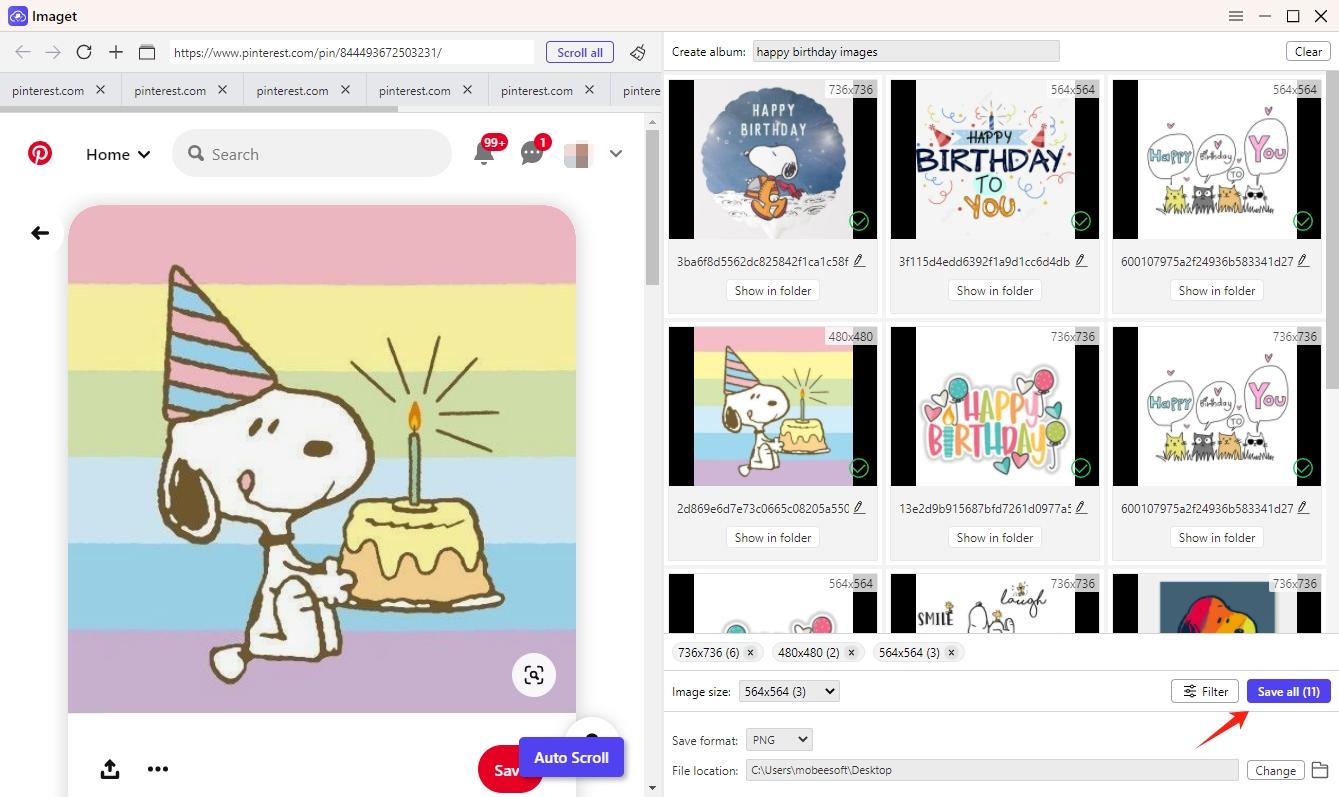
- Launch Imaget and use its built-in browser to access Pinterest page containing the images you want to download, then scroll the page and let Imaget scan for available images.
- Select your preferred Pinterest images and use the available filtering options to narrow down the results by image format or size.
- Click the “Save all” button and Imaget will save the selected images in batches.
4. Conclusion
There are several reasons why Pinterest won’t let you download images, including download restrictions, outdated apps, browser issues, unstable internet connections, and insufficient device permissions. Fortunately, most common problems can be resolved by checking download options, updating the app, clearing browser cache, and reviewing device settings.
However, if you frequently save Pinterest images, manually downloading them one by one isn’t an efficient approach. We recommend Imaget as a convenient solution for bulk downloading Pinterest images. Its image detection, previewing, filtering, and batch downloading features make managing large image collections much easier.
- How to Download All Images from WordPress Media Library?
- How to Download Dreamstime Images Without Watermark?
- Best Poipiku Image Downloaders Compared: Features and Pros & Cons
- Why Can't I Download Images from Google Anymore?
- How to Download Images from Gelbooru: A Complete Guide
- Best Image Downloaders to Download Bato Manga in 2026